Automating insurance eligibility and benefits checks can save healthcare providers significant time and reduce costly errors. Manual processes often lead to inaccuracies, claim denials, and delays in patient care. By leveraging technology like APIs, EDI, AI, and RPA, organizations can streamline these tasks, improve accuracy, and enhance revenue cycles. Here's a quick summary of the process:
- Identify inefficiencies: Map out manual workflows and pinpoint bottlenecks.
- Ensure compliance: Meet HIPAA and security standards like encryption and audit logs.
- Integrate APIs and EDI: Connect directly with payer databases for real-time verification.
- Use AI and RPA: Automate data extraction, validation, and repetitive tasks.
- Connect systems: Link automation tools to EHR and PM platforms for seamless data flow.
- Test and monitor: Regularly evaluate system performance and refine processes.
Automation reduces verification times from minutes to seconds, cuts labor costs by up to 75%, and lowers claim denial rates by 20–30%. Start by auditing your current process, ensuring compliance, and implementing scalable tools to improve efficiency and accuracy.
Real-Time Eligibility Verification & Enhanced Benefits Automation In Patient Access Plus
Step 1: Review Current Processes and Compliance Requirements
Before diving into automation, it’s crucial to understand where your current processes are falling short. Take a close look at your team’s eligibility checks to identify time-consuming pain points. At the same time, ensure that any automation aligns with federal regulations - especially HIPAA - right from the start. This foundational step sets the stage for integrating compliance measures as you move toward automation.
Identify Issues in Manual Processes
Start by mapping out your entire verification workflow. Many healthcare providers face significant challenges with inaccuracies during patient registration. These errors aren’t just minor hiccups - they can create a ripple effect of problems. Manual processes often require staff to juggle multiple payers’ portals, make phone calls, and navigate complex benefit structures.
Claim denials are a major consequence of these inefficiencies. For instance, 56% of providers cite patient information errors as a leading cause of denied claims, while 30% attribute denials to incomplete or inaccurate registration data. These denials ultimately pull staff away from patient care and revenue-generating tasks. Smaller practices feel this strain even more, as they often lack the personnel or tools to handle verification demands effectively.
Document your workflow, identify bottlenecks, and calculate the time wasted on manual tasks. For example, determine how long each verification takes, which payers require phone calls versus portal access, and where errors tend to occur most frequently. This analysis is critical because automation targets these inefficiencies, improving both accuracy and speed. Establishing this baseline will also help you measure the impact of automation once it’s implemented.
Ensure Compliance with HIPAA and Industry Standards
Once you’ve identified workflow challenges, it’s time to address regulatory and security requirements. Automation doesn’t eliminate the need for compliance - it makes it even more essential. Any system you adopt must include a Business Associate Agreement (BAA), encrypt data both in transit and at rest, and maintain audit logs to track all access to protected health information. Failing to meet HIPAA standards can result in fines of up to $1,500,000 annually, and in 2023 alone, over 133 million patient records were exposed.
When choosing automation tools, look for ones with certifications like SOC 2 Type II or ISO 27001, which indicate regular audits of security controls. These tools should also support role-based access control, ensuring staff only access the minimum information necessary for their roles. Implement least-privilege roles and establish breach-notification procedures, even for vendors covered by a BAA.
Human error is another significant risk. According to the Journal of Medical Internet Research, 33% of healthcare breaches are caused by mistakes made by people. Automation can help reduce this risk by standardizing security protocols and minimizing the manual handling of sensitive data. Strong security measures not only protect patient information but also make it easier to integrate automated systems into your operations. Additionally, plan for regular risk assessments to identify system vulnerabilities and stay up to date with evolving regulations like NIST and HITECH. Building compliance into your automation strategy from the start will save time and resources compared to fixing issues later on.
Step 2: Use APIs and Connectivity Tools for Real-Time Verification
After reviewing your processes, the next step is to establish direct connections to payer databases. This approach removes the hassle of juggling multiple logins and making time-consuming phone calls. By combining APIs and EDI systems, you can automate communication and seamlessly pull real-time data from insurers into your workflows. The goal here is to integrate these tools effectively for smoother operations.
Select APIs for Payer Database Integration
APIs serve as a bridge between your internal systems and insurance carriers. When choosing an API, focus on those that provide real-time eligibility checks, insurance discovery, and claim status updates. Opt for APIs that deliver detailed benefit data, such as information on deductibles, copayments, and out-of-pocket limits. This ensures your team can offer patients precise cost estimates.
Look for APIs that support widely-used standards like REST, ANSI X12 (270/271), HL7, FHIR, and SOAP. These standards allow you to connect with a variety of payers without needing separate systems for each one. Also, make sure the API integrates smoothly with your existing EHR and management systems, as discussed in Step 1.
Set Up EDI Transactions
Electronic Data Interchange (EDI) plays a key role in automating eligibility verification. It enables your organization to send patient and insurance details to payers and receive instant responses about coverage. EDI also ensures accuracy by reducing paperwork and preventing incorrect payments, benefiting both insurers and patients.
While APIs provide real-time data, EDI handles the structured exchange of information automatically. To implement this, start by setting up an EDI connection with each payer’s system. Once established, the EDI setup will handle sending verification requests and processing responses, ensuring accuracy and speeding up workflows. It’s important to align your internal systems with each payer's specific EDI requirements to avoid delays or errors that could disrupt efficiency.
Step 3: Apply AI and RPA for Data Extraction and Validation
Once API and EDI integration is in place, the next step is to streamline data processing with AI and RPA. These technologies work hand-in-hand to handle tasks that range from repetitive to complex. RPA excels at managing structured, repetitive activities like data entry and verification requests. On the other hand, AI steps in to analyze unstructured data, identify inconsistencies, and improve processes over time using tools like OCR, NLP, and machine learning. Together, they create a fully automated system for insurance verification, laying the groundwork for using OCR and RPA to further simplify data extraction and validation.
Use OCR for Insurance Card Scanning
OCR (Optical Character Recognition) technology is a game-changer for pulling essential details from insurance cards. It captures information like member IDs, policy numbers, plan types, and payer details without the need for manual input. However, basic OCR tools often miss critical details, such as claim payer IDs, if they aren’t explicitly printed. That’s where AI-powered OCR comes in - it doesn’t just read text; it interprets benefits summaries, detects patterns, and flags inconsistencies.
"Optical Character Recognition (OCR) combined with AI ensures that crucial details such as member ID, plan type, and payer details, are captured accurately and instantly."
AI-enhanced OCR can reduce errors by up to 98% while doubling productivity and accuracy in insurance verification processes. For healthcare organizations, this can translate into monthly savings of $4,500 to $8,000 by automating insurance capture workflows. To achieve the best results, ensure that insurance cards are scanned with high image quality, as this helps capture every detail accurately. Once OCR has extracted the necessary data, RPA steps in to verify and update records seamlessly.
Automate Verification with RPA
RPA bots are designed to take over repetitive, time-consuming tasks involved in eligibility verification. These bots can extract data from EHR systems, log into payer portals, retrieve and validate information, update records, and cross-reference patient data with insurance databases - all in real time to ensure claims are accurate.
Eligibility verification is the most common use case for RPA, with 59% of health systems already using it for this purpose. Automation not only saves time - 21 minutes per transaction, to be exact - but also significantly boosts efficiency. For instance, a mid-sized healthcare billing company that implemented RPA bots scaled its daily verifications from 50 to 500 within weeks, reduced claim denials by 28%, and saved over 25 staff hours weekly.
Lynne Hildreth, R1 Vice President of Automation, highlights the impact of automation:
"Eligibility verification is very labor-intensive with teams manually checking and re-checking numerous payer portals and websites for each patient. Automation eliminates these time-consuming, repetitive tasks and opens the door for efficient eligibility re-checks downstream, reducing denials and lowering the cost to collect."
Step 4: Connect Automation to Existing Systems
Bringing automation into your existing setup can streamline operations by eliminating manual data transfers and creating unified workflows. After achieving automated data extraction with AI and RPA, the logical next step is linking these tools with your current systems.
Link Automation Tools to EHR and PM Systems
To ensure seamless integration, use APIs and direct system connections that enable real-time data sharing between automation tools and platforms like Epic or Cerner. APIs and EDI can also facilitate structured, instant data exchanges with insurance companies. The goal is to enhance your existing systems, not replace them, ensuring that verified data flows directly into your EHR and PM systems.
For instance, in 2025, AdvancedMD incorporated its "eEligibility" feature directly into its Practice Management system. Similarly, Thoughtful AI introduced digital workers that integrate with existing platforms, automating revenue cycle management tasks without requiring system overhauls.
Security is a top priority during integration. Automation tools must comply with regulations like HIPAA, the HITECH Act, SOC 2, HITRUST, and GDPR when handling sensitive patient data. Be sure to choose solutions with proper certifications and robust security measures, such as encryption, multi-factor authentication, and secure network connections.
Set Up Real-Time Alerts and Updates
Once integrated, automated systems can provide real-time updates on eligibility and benefits throughout the revenue cycle, from registration to billing. This ensures patient insurance information stays accurate, reducing the risk of claim denials caused by outdated details. Real-time alerts also enhance the verification process, contributing to smoother operations. For example, the system can automatically update patient records as coverage changes, creating a two-way data flow between automation tools and your EHR.
These alerts can also notify providers when patients approach service frequency limits, helping avoid claims denials for exceeding coverage caps. Automation has significantly cut verification times - from 12 minutes to just 45 seconds per patient. Furthermore, real-time eligibility checks have been shown to reduce claim denial rates by 20–30%. Pre-visit verification, supported by these updates, has also lowered appointment no-show rates by 22% on average. To ensure optimal performance, aim for 95% of verifications to complete in under 2 seconds and maintain a system uptime of 99.9%.
sbb-itb-116e29a
Step 5: Build Custom Automation Solutions for Specific Needs
While generic tools handle basic tasks, they often fall short when it comes to meeting the unique demands of specific workflows or payer requirements. That’s where custom automation solutions come in. By building on the earlier steps of identifying inefficiencies and compliance challenges, these tailored solutions can help bridge the gap between standard tools and the specific needs of your organization.
Design Workflows for Healthcare-Specific Challenges
The first step is pinpointing where your current processes are breaking down. Custom workflows should target the specific bottlenecks that slow your team down. For instance, you might need solutions for managing multi-payer scenarios, navigating pre-authorization requirements for certain procedures, or implementing specialized validation rules tailored to your patient population.
These tailored workflows can have a direct impact on reducing verification delays. For example, automated batch processing can handle multiple verifications at the same time, speeding up the process significantly. Automated alerts can notify your team about coverage updates ahead of patient appointments, making it easier to manage frequent plan changes. Once these workflows are designed, the next critical step is thorough testing and refinement to ensure they function as intended.
Partner with Scimus for Automation Testing

When it comes to custom workflows, precise validation is essential. Scimus specializes in custom software development, quality assurance testing, and application maintenance specifically tailored for healthcare automation. Their testing ensures your custom solutions integrate seamlessly with existing EHR and practice management systems, all while maintaining compliance with HIPAA regulations.
But it doesn’t stop there. As regulations evolve and your needs shift, ongoing support becomes crucial. Scimus provides continuous maintenance and support to address any glitches, roll out security updates, and improve functionality over time. With consistent optimization, businesses can achieve up to a 98% reduction in errors during eligibility verification.
Step 6: Test, Monitor, and Improve Your Automated System
The difference between a system that works seamlessly and one that causes problems often lies in how well it’s tested, monitored, and refined over time.
Run Thorough QA Testing
Begin with functional testing to ensure every part of your system operates as intended. It should handle coverage limits, exclusions, and pre-authorization requirements without requiring manual input. Next, conduct stress tests to see how the system performs under peak load conditions, ensuring it integrates smoothly with EHR and PM systems.
Don’t overlook security and privacy. Your system must comply with HIPAA regulations and, ideally, hold certifications like SOC 2 or HITRUST. Test encryption methods, role-based access, and multi-factor authentication to safeguard sensitive data. Keep detailed records of your test results and verification processes for audits. Additionally, train your staff to use the system effectively and handle exceptions. User acceptance testing can reveal practical issues that automated tests might miss. Regularly monitor these metrics to fine-tune your system's performance.
Monitor Performance and Scalability
Once your system is live, keep an eye on key performance indicators, such as the number of successfully processed claims, rejection rates, and the accuracy of out-of-pocket expense calculations. These metrics will help you measure how well the system reduces claim denials.
Set up exception reporting to catch and flag unverified eligibility cases so your team can resolve them quickly. Leverage AI tools for real-time detection of inconsistencies and maintain detailed audit trails to stay compliant. By reviewing these metrics regularly, you can spot trends, streamline workflows, and ensure the system grows alongside your patient volume.
Benefits and ROI of Automation
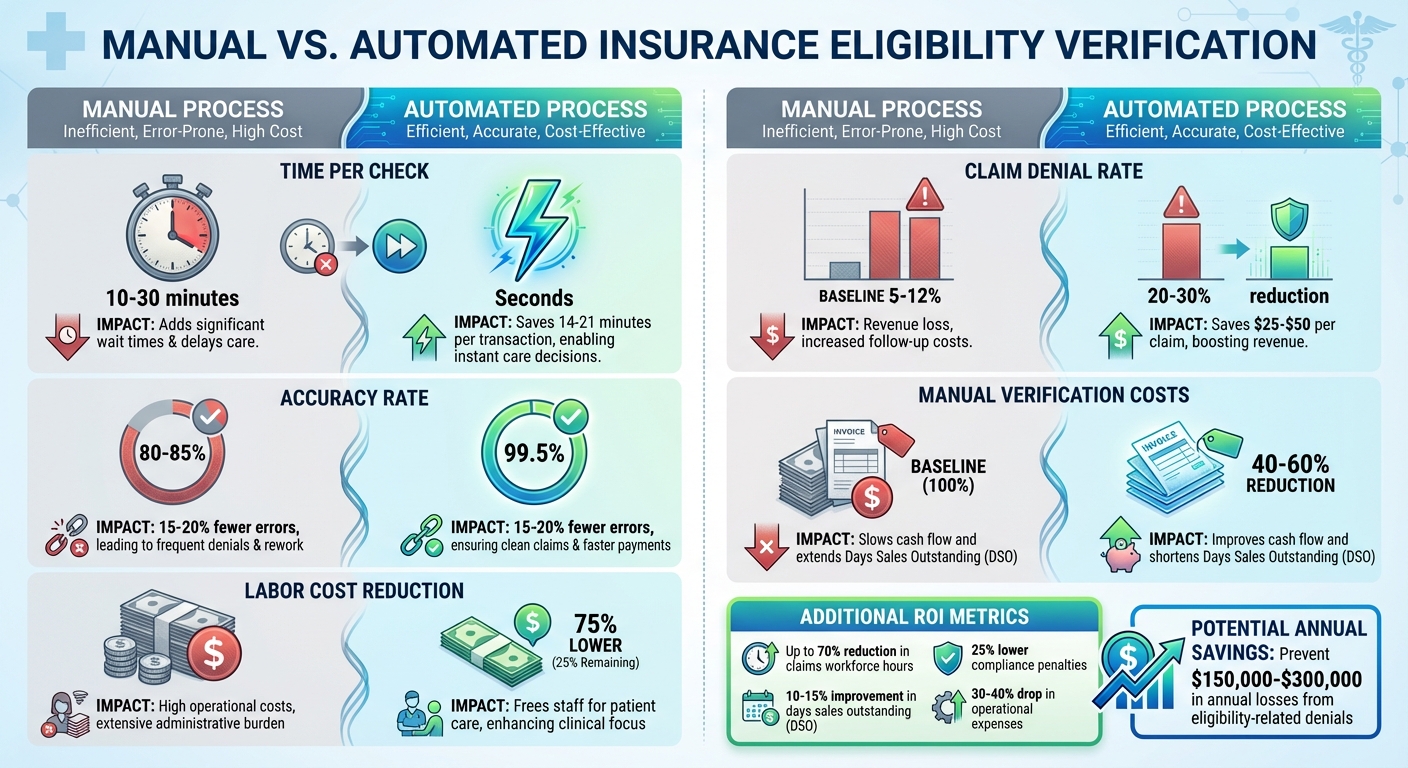
Manual vs Automated Insurance Eligibility Verification: Time, Cost, and Accuracy Comparison
Automation brings tangible financial advantages, especially when paired with the system improvements outlined earlier. By cutting manual eligibility checks from 10–30 minutes (with 80–85% accuracy) down to mere seconds (with 99.5% accuracy), automation not only saves time but also significantly improves accuracy. This efficiency frees up staff for other responsibilities and enhances revenue potential.
The financial impact is undeniable. Automation can slash labor costs for eligibility verification by as much as 75%. Operational expenses drop by 30–40% with intelligent automation. For large healthcare organizations, eligibility-related claim denials could jeopardize $3–5 million in annual revenue. Smaller practices aren’t immune either, often facing a 15–25% reduction in cash flow due to these denials, with administrative costs ranging from $12 to $18 per patient encounter. By automating verification processes, organizations can prevent annual losses of $150,000–$300,000 tied to eligibility-related denials.
Manual vs. Automated Process Comparison
| Metric | Manual Process | Automated Process | Impact |
|---|---|---|---|
| Time per check | 10–30 minutes | Seconds | Saves 14–21 minutes per transaction |
| Accuracy rate | 80–85% | 99.5% | 15–20% fewer errors |
| Labor cost reduction | Baseline | 75% lower | Frees staff for patient care |
| Claim denial rate | 5–12% | 20–30% reduction | Saves $25–$50 per claim |
| Manual verification costs | Baseline | 40–60% reduction | Improves cash flow and days sales outstanding |
Long-Term ROI
The benefits of automation extend well beyond initial cost savings. Over time, it fosters greater operational efficiency. For instance, automation can reduce claims workforce hours by up to 70% and lower compliance penalties by 25%. These improvements translate into better cash flow, with a 10–15% boost in days sales outstanding (DSO). By minimizing repetitive administrative work, staff can focus on more meaningful tasks, like patient care. These ongoing efficiencies not only save money but also create opportunities for further operational improvements across the organization.
Next Steps
Now that you've reviewed your processes and API integrations, it's time to take action and move toward automated eligibility checks. Start by auditing your current verification workflows to identify bottlenecks and areas where compliance might be slipping. Document key metrics like how long manual checks take, where mistakes are most common, and which team members are spending the most time on these tasks. This data will serve as a baseline to measure the efficiency gains once automation is implemented.
Make sure your system is fully prepared for HIPAA and regulatory compliance by incorporating key security measures like end-to-end encryption, role-based access controls, and multi-factor authentication. With HIPAA violation fines ranging from $100 to $50,000 per incident, prioritizing these safeguards from the outset is non-negotiable.
Keep your system up to date by reflecting changes in payer policies and conducting regular audits to maintain compliance. Ensure your team is continually trained on updated policies and procedures. Tools like real-time compliance monitoring and automated reporting can help you adapt to regulatory shifts efficiently. These updates will ensure your system stays reliable and aligned with evolving regulations.
Finally, complete your automation setup by incorporating custom testing solutions to guarantee smooth system performance. If you're looking for a tailored automation solution that integrates seamlessly with your EHR and practice management systems, reach out to Scimus for expert development and testing services.
The real question isn't whether to automate - it's how soon you can get started.
FAQs
How does automation improve the accuracy and speed of insurance eligibility checks?
Automation brings a whole new level of accuracy and speed to insurance eligibility checks. By eliminating the need for manual data entry, it drastically reduces human errors, achieving accuracy rates as high as 99.9%. This ensures that eligibility details are both precise and dependable.
On top of that, automation transforms the verification process, reducing what used to take several minutes into just seconds. This faster turnaround not only prevents delays but also helps healthcare providers and insurers avoid claim denials, simplify workflows, and boost operational performance.
What should I consider to ensure compliance when automating insurance eligibility checks?
When setting up automated insurance eligibility checks, protecting patient data should be a top priority. Make sure your processes comply with HIPAA regulations to uphold privacy standards. It's also important to account for the specific requirements of each insurer, as rules can vary from one payer to another. Keeping accurate and thorough audit trails is another key step, as they promote transparency and accountability. Lastly, ensure you follow all relevant state and federal privacy laws to minimize legal risks while streamlining your operations.
How can AI and RPA streamline insurance eligibility and benefits verification?
AI and RPA are revolutionizing the way insurance verification is handled. AI takes on the heavy lifting of analyzing eligibility data, spotting patterns, and flagging potential issues. Meanwhile, RPA (Robotic Process Automation) steps in to handle repetitive tasks like pulling data, validating it, and cross-checking information. Together, they ensure quick, precise verification while cutting down on human errors.
When these technologies are combined, healthcare providers and insurers can work more efficiently, lighten their administrative load, and stay aligned with industry regulations. This seamless integration not only saves time and money but also enhances the overall flow of operations.