Missed appointments cost healthcare providers millions annually, but a well-designed patient booking system can increase appointment rates by 25–40%. Patients today demand convenience, mobile accessibility, and secure systems to book appointments anytime, anywhere. Practices relying solely on phone bookings risk losing up to 60% of potential patients.
Key takeaways for building an effective system:
- Simplify scheduling: Offer 24/7 online booking with real-time availability and mobile-friendly design.
- Boost accessibility: Ensure compatibility across devices and provide clear navigation for all users, including seniors.
- Enhance patient engagement: Use automated reminders, clear instructions, and secure payment options.
- Ensure data security: Meet HIPAA standards with encryption and role-based access controls.
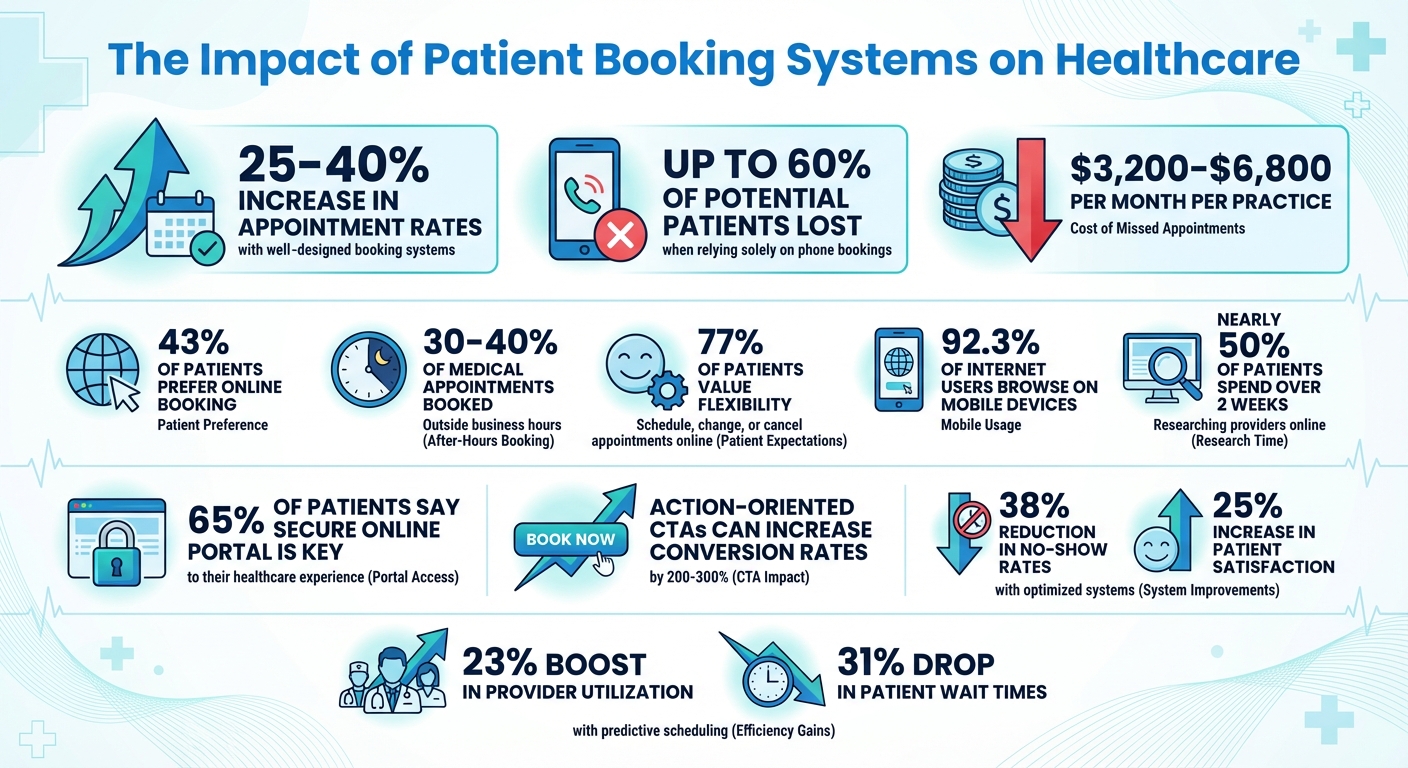
Patient Booking System Statistics: Impact on Healthcare Conversions and Efficiency
Build Full Stack Doctor Appointment Booking System Using MERN Stack | Complete React JS Project
Planning Your Patient Booking System
Before diving into development, it's crucial to understand who will use your booking system and the specific problems it needs to address. Bring all stakeholders into the conversation and map out your current scheduling workflow. This will help you identify gaps between your current practices and your goals. Different groups encounter different challenges: patients might get frustrated with confusing appointment options or limited booking hours, while staff often deal with double bookings or the chaos of excessive phone coordination.
Patient Participation Groups (PPGs) can offer insights that your internal team might overlook. Involving these groups early and gathering their feedback throughout the process is invaluable. They can flag accessibility issues, point out unclear terminology, or even raise concerns about data privacy. For instance, using straightforward terms like "blood test" instead of "phlebotomy" can make a big difference in how easily patients complete bookings.
This groundwork helps you pinpoint user-specific challenges and establish clear goals for your system.
Finding User Needs and Pain Points
Understanding real user frustrations is key to improving your booking system. Research shows that nearly half of patients spend over two weeks researching providers online. During this time, they’re not just comparing services - they’re also judging how easy it is to book an appointment. A system that’s too complicated, uses unclear language, or doesn’t work well on mobile devices can drive patients to competitors with smoother booking experiences.
Digital literacy is another area to consider carefully. For example, patients aged 65 and older are increasingly using tablets because they’re easier to navigate and offer features like magnification. However, many in this age group may still need extra support when using online systems. Providing clear instructions, simple navigation, and trained staff to assist these users can make a huge difference. The same principles apply to patients with mobility challenges, sensory impairments, or learning difficulties.
Additionally, review your clinical rotas and appointment types to ensure patients can easily find the right provider. Clear descriptions of clinician specialties can reduce mismatched appointments, which not only waste time but also contribute to missed appointments. A well-organized system improves booking completion rates and overall patient satisfaction.
Setting Goals and KPIs
Vague objectives won’t help you measure success. Instead, define clear, measurable goals from the outset. For example, track your booking completion rate - the percentage of patients who start and finish the booking process. Use post-appointment surveys to gauge patient satisfaction and monitor how many missed appointments your system prevents compared to your current baseline.
User research should directly inform these measurable goals and key performance indicators (KPIs). Healthcare organizations that track KPIs can make better decisions, improve efficiency, and turn data into actionable improvements. Consider metrics like mobile versus desktop booking rates and the average time it takes to complete a booking. These numbers will highlight where your system performs well and where adjustments are needed.
Set realistic benchmarks based on industry standards, but tailor them to your current performance and patient demographics.
Meeting Compliance and Security Requirements
Once you’ve identified user needs and set your KPIs, the next step is ensuring your system meets compliance and security standards. If your system handles Protected Health Information (PHI) or Electronic Protected Health Information (ePHI), it must adhere to HIPAA and HITECH regulations. These laws require safeguards - administrative, physical, and technical - to protect the confidentiality, integrity, and security of patient data. Conduct a risk assessment to identify vulnerabilities specific to your organization.
It’s important to note that no software is inherently HIPAA compliant - it can only support compliance. This means you’ll need to configure your tools properly, establish clear policies, and maintain ongoing vigilance. If you work with third-party vendors handling PHI, you must sign a Business Associate Agreement (BAA) to define responsibilities and obligations.
Assign security and privacy officers to oversee ePHI protection measures. Develop documented policies covering security protocols, staff training, and incident response. Ensure all ePHI, whether stored or transmitted, is encrypted according to NIST standards, particularly when data moves outside your secure internal servers. Role-based access controls are also essential, limiting staff access to only the information they need for their roles.
These measures are critical for maintaining patient trust. In fact, 65% of patients say access to a secure online portal is a key part of their healthcare experience. By prioritizing compliance and security, you not only protect sensitive data but also enhance patient confidence in your system.
Features That Drive Conversions
Once your planning is complete, it’s time to add features that encourage patients to book appointments. These tools not only make the process smoother but also have a direct impact on increasing conversions.
Simple Booking and Registration
In today’s fast-paced world, online self-scheduling is a must for healthcare providers. Patients expect 24/7 access to book, reschedule, or cancel their appointments. Offering real-time availability and syncing with popular calendars like Google Calendar, Outlook, or Apple’s calendar helps avoid double bookings and ensures accuracy. Keep booking forms simple and only ask for essential details to make the process quick and hassle-free.
Automated Reminders and Notifications
Missed appointments can cost practices anywhere from $3,200 to $6,800 per month. Automated reminders, sent via email or SMS, can significantly reduce these no-shows. These alerts make it easy for patients to reschedule or cancel if needed, while also freeing up staff to focus on other tasks. Plus, notifications can keep patients informed about unexpected schedule changes.
Secure Payment Processing
Patients trust providers who prioritize the safety of their personal and financial information. Secure payment systems not only protect sensitive data but also comply with PCI DSS standards when using reputable PCI Level 1 providers. With 43% of patients preferring online booking, integrating secure payment options can enhance trust and demonstrate your commitment to safeguarding their information.
Designing a User-Friendly Interface
A well-thought-out interface does more than just look good - it directly impacts conversion rates and aligns with the primary objectives of an effective patient booking system. If patients encounter a cluttered or confusing design, they’re more likely to abandon the process before securing their appointment. The goal is simple: create a smooth, frustration-free experience from the first click to the final confirmation.
Mobile-Responsive and Accessible Design
With 92.3% of internet users browsing on mobile devices, your booking system must function effortlessly on smartphones and tablets. This means responsive design that adapts to all screen sizes, featuring clearly tappable buttons, easy-to-read text, and well-sized forms.
But accessibility isn’t just about mobile optimization. It’s also about meeting the needs of older adults, users with limited digital skills, or those with physical impairments. Incorporate alternative login options like biometric authentication - facial recognition, fingerprint scanning, or voice commands - so users aren’t stuck fumbling with complex passwords. Interactive guides and helpful tips can further simplify navigation, ensuring everyone can complete their booking with ease.
Simplified Booking Flow
The more steps in your booking process, the higher the risk of losing patients along the way. For instance, relying solely on phone scheduling can cost you up to 60% of potential bookings. Instead, offer features like real-time provider availability and bold, action-oriented CTAs (e.g., "Schedule Free Consultation") to encourage users to take the next step. These small changes can increase conversion rates by as much as 200-300%.
For returning patients, save time by pre-filling their information using secure identifiers. And don’t underestimate the importance of speed - make sure your pages load in under three seconds, as delays can drive users away. Studies show that practices offering online scheduling see 25-40% more new patient appointments, proving that a streamlined process isn’t just convenient - it’s profitable.
Using Visual Cues to Guide Users
Visual elements play a crucial role in guiding patients through the booking process. Features like progress indicators help users see how many steps are left, reducing any anxiety about long forms. Immediate, clear error messages make it easy to fix mistakes on the spot. Use contrasting colors for key buttons and highlight required fields to avoid confusion. These thoughtful design choices improve layouts and controls, keeping users engaged and confident as they move through the system.
sbb-itb-116e29a
Technical Development and Integration
Every seamless booking experience is powered by a strong technical backbone. Your system must support real-time appointment scheduling, integrate smoothly with healthcare records, and adapt as your patient base expands. A well-designed technical architecture not only avoids costly overhauls later but also improves operational efficiency and increases conversion rates.
Database and API Integration
An API-first strategy is crucial for creating a scalable patient booking system that grows alongside your practice. Modern healthcare API ecosystems enable real-time data exchange, offering flexibility that outdated, rigid integrations simply can’t provide. This approach supports personalized care while enhancing overall system value.
Your data layer should embrace polyglot persistence, using the best database types for specific data needs. For instance, structured clinical data works well in relational databases, while documents and images are better suited for scalable object storage.
Cloud Infrastructure for Scalability
Cloud infrastructure takes data management a step further, ensuring your system can handle evolving demands and connected care delivery. Compared to traditional on-premises servers, cloud solutions offer improved scalability, reliability, and cost efficiency. A hybrid or multicloud setup often strikes the right balance between compliance, performance, and cost-effectiveness. Additionally, a flexible cloud environment allows you to embed essential security features directly into your system’s architecture.
Data Security and Role-Based Access
Protecting sensitive data is non-negotiable and should be a core part of system design. To safeguard electronic protected health information (ePHI) and meet compliance requirements, integrate encryption and role-based access controls into your framework. Use TLS/SSL protocols for encrypting data in transit and AES-256 encryption for securing data at rest. Role-based access ensures that staff members - whether front-desk employees or physicians - can only access the patient information relevant to their role. This layered security strategy minimizes breach risks while maintaining smooth workflows.
Testing, Launch, and Optimization
Thorough testing, a well-planned launch, and ongoing tweaks are key to creating a smooth booking experience that encourages users to follow through. These steps can make the difference between a system that improves workflows and one that frustrates both patients and staff.
End-to-End Testing for Usability and Performance
Start with a solid test plan that covers everything from functional requirements to security protocols, including HIPAA compliance. Use automated testing for repetitive tasks, while reserving manual testing for assessing real-world usability. Pay extra attention to high-risk areas like patient data security, system reliability during busy periods, and integration with existing healthcare systems. Simulate peak usage with load testing and incorporate these tests into your CI/CD pipeline to catch issues early and often.
Analytics and Conversion Tracking
Analytics are your roadmap for making improvements. Keep an eye on scheduling trends, peak demand times, no-show rates, and how resources are being used. Conversion metrics - like booking completion rates and points where users abandon the process - offer a clear picture of what’s working and what needs fixing. For instance, healthcare providers leveraging predictive scheduling have reported a 23% boost in provider utilization and a 31% drop in patient wait times. This kind of data is invaluable for fine-tuning your system.
Continuous Improvement Methods
Feedback from both patients and staff is gold for refining appointment types, durations, and scheduling options. Systems that are updated based on real-world usage can cut no-show rates by as much as 38% and increase patient satisfaction scores by 25%. Regularly review your key performance indicators and stay on top of scheduling trends to keep your system running smoothly. Also, make sure your staff is trained on new features and keep patients informed about updates through email campaigns or in-office signage. These small but consistent efforts can make a big difference.
Partnering with Scimus for Custom Solutions

Tackling the challenges of outdated systems and missed appointments requires more than just a quick fix - it demands expertise in healthcare technology, security, and user experience design. That’s where Scimus steps in. They take a thoughtful, step-by-step approach to custom software development. It all starts with understanding your specific goals and analyzing your current scheduling processes to pinpoint bottlenecks and unique needs. By laying this foundation, Scimus ensures that the final product fits seamlessly into your workflows, reflects your brand values, and meets patient expectations. The result? A booking system that not only works for your operations but also boosts patient engagement and drives conversions.
Custom Development for Healthcare Providers
Healthcare providers face challenges that off-the-shelf solutions just can’t solve. Scimus specializes in creating systems that integrate smoothly with your existing setup while meeting rigorous standards like HIPAA, ISO27001, and NIST. Security is baked into the design, safeguarding patient data and ensuring privacy. Beyond the basics of self-scheduling and notifications, Scimus tailors functionality to address the specific needs of your practice. Considering that 77% of patients value the ability to schedule, change, or cancel appointments online, and with 30–40% of medical appointments now being booked outside of business hours, a customized system can tap into demand that traditional phone-based scheduling often misses.
Service Plans for Every Practice
Every healthcare practice is different, and Scimus recognizes that with flexible service plans designed to match your scale and complexity.
- Basic Development Plan: Perfect for smaller practices, this plan covers essentials like web and mobile app development, along with quality assurance testing. It’s a great starting point for those new to online scheduling.
- Advanced Development Plan: Suited for medium to large projects, this plan includes web app development, automation testing, and ongoing maintenance, offering more robust features for growing practices.
- Enterprise Solutions Plan: Built for large healthcare organizations, this plan goes all out with blockchain integration for added security, dedicated development teams, and industry-specific customizations.
Each plan comes with pricing tailored to your exact needs, ensuring you only pay for what you require.
Long-Term Support and Maintenance
Launching your booking system is just the start of the journey. Scimus provides post-launch training and continuous maintenance to keep your system running smoothly. Their support team addresses technical issues quickly and ensures your system stays up-to-date with changing regulations and evolving patient demands. With regular updates and expert assistance, your booking system will remain a valuable asset for years to come.
Conclusion and Next Steps
Creating a patient booking system that truly drives results boils down to a few key principles. Start by simplifying your booking forms - keep the fields minimal to reduce errors and frustration. Since most patients are booking appointments on their phones, a mobile-first design is non-negotiable. Your forms should function flawlessly on smaller screens. Add clear and compelling CTAs to guide patients toward taking action. These straightforward design choices help build trust and provide smooth access across multiple channels.
Speaking of trust, it’s a cornerstone of healthcare. Highlight doctor credentials, showcase patient reviews, and implement visible security measures like SSL certificates to reassure visitors that their information is safe. Offering multiple booking options - whether it’s via phone, online forms, chat, or even social media - ensures patients can choose the method that works best for them. Make sure scheduling is consistent and accessible across all digital touchpoints. And don’t forget the power of data - use analytics and A/B testing to fine-tune your system, experimenting with approaches to see what resonates most with your audience.
Building a HIPAA-compliant system that balances security, usability, and conversions can feel overwhelming. That’s where expert help can make all the difference. By focusing on these proven strategies, your practice can streamline operations while earning patient trust. Scimus brings deep expertise in healthcare technology, user experience design, and security standards. Their solutions are designed to simplify booking, safeguard patient data, and boost conversions - all while integrating smoothly into your existing workflows.
Ready to transform how your patients book appointments? Contact Scimus to discuss your needs and explore service plans - Basic, Advanced, or Enterprise - that align with your practice’s size and goals. With tailored development and ongoing support, Scimus can be the partner you need to achieve lasting success.
FAQs
How does a patient booking system help reduce no-shows?
A thoughtfully crafted patient booking system can significantly cut down on no-shows by automating reminders through SMS, email, or push notifications. These timely reminders help ensure patients stay informed about their upcoming visits. Plus, real-time confirmation simplifies the process of securing appointments, while self-scheduling options let patients book or reschedule at their own convenience.
By enhancing communication and giving patients greater control over their appointments, such systems reduce scheduling conflicts and boost attendance rates - a win for both patients and healthcare providers.
What are the key features of a mobile-friendly patient booking system?
A patient booking system designed for mobile use needs to focus on responsive design so it functions smoothly across all devices, from smartphones to tablets. It should feature easy-to-use navigation that allows users to quickly locate and book appointments without hassle. Providing clear appointment details is essential to avoid misunderstandings and streamline the booking process.
Features like automated reminders can significantly cut down on missed appointments, while quick load times enhance the overall user experience. On top of that, the system must prioritize secure data management to safeguard sensitive patient information. Seamless integration with existing healthcare platforms is also key to ensuring efficient and uninterrupted operations.
How can I make sure my patient booking system meets HIPAA requirements?
To make sure your patient booking system aligns with HIPAA regulations, focus on safeguarding data security and privacy. Start by implementing end-to-end encryption, which protects sensitive information both while it's being transmitted and when it's stored. Also, set up role-based access controls so that only authorized personnel can access specific parts of the system.
It's equally important to keep detailed audit logs to monitor all system activity. Use secure communication channels for sending appointment reminders or updates, and ensure you have a signed Business Associate Agreement (BAA) with your software provider. These measures will help protect patient data and keep your system compliant with HIPAA requirements.