AI assistants are transforming how businesses handle repetitive tasks like scheduling, data entry, and follow-ups. By automating these processes, companies save time, reduce errors, and improve productivity. For example:
- Time Savings: Automating scheduling can save employees up to 26 minutes daily.
- Cost Reduction: AI solutions can cut labor costs by up to 60%.
- Improved Accuracy: Error rates in routine tasks drop by 50% when managed by AI.
- 24/7 Availability: AI assistants handle inquiries and tasks around the clock.
These tools are particularly impactful in industries like healthcare and fintech, where compliance and efficiency are critical. Companies like Scimus specialize in creating custom AI solutions tailored to specific workflows, ensuring seamless integration and measurable results. AI assistants use natural language processing (NLP) and machine learning to manage tasks across platforms like voice calls, emails, and chat interfaces, enhancing scheduling, client intake, and communication processes.
Key Benefits:
- Healthcare: Reduced follow-up times by 70% and improved patient access to care.
- Customer Service: Automated follow-ups boost satisfaction by 17%.
- ROI: Businesses report a 3.5× return on investment with a 40% increase in productivity.
The future of AI assistants includes advanced features like predictive analytics and independent decision-making, helping businesses stay competitive and efficient.
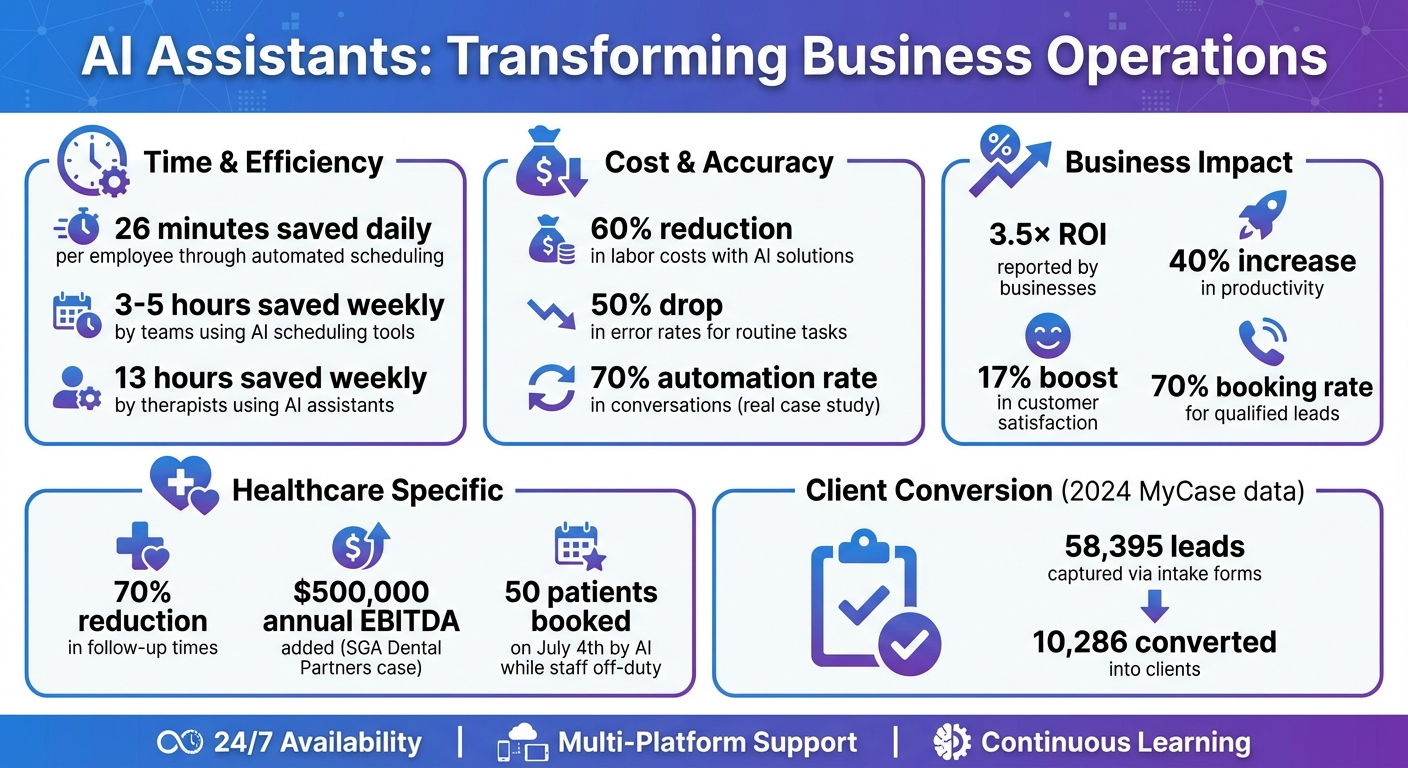
AI Assistant Benefits: Time Savings, Cost Reduction, and ROI Statistics
How to Build & Sell AI Agents: Ultimate Beginner’s Guide
How AI Assistants Handle Scheduling, Intake, and Follow-Ups
AI assistants simplify appointment management, collect client data, and maintain consistent communication. They operate across various platforms - voice calls, text messages, chat interfaces, and email - allowing clients to connect in the way that suits them best. Using natural language processing (NLP), these systems understand user intent and respond in a conversational manner, handling routine tasks without needing human involvement. Let’s explore how these capabilities enhance scheduling, intake, and follow-up processes.
AI Scheduling Assistants
AI scheduling assistants take the hassle out of coordinating calendars by syncing schedules and detecting availability. They integrate seamlessly with industry-specific tools like Electronic Health Records (EHRs) in healthcare or calendar apps used in fintech and customer service. This allows them to identify open time slots and align schedules across teams. For example, when a patient calls to book an appointment or a client requests a consultation, the AI instantly processes the request, books the time, and sends a confirmation - all through an intuitive conversation. These systems also handle cancellations and rescheduling, keeping connected systems updated automatically.
Automating Client Intake
The client intake process, often tedious and prone to errors, becomes much smoother with automation. Before appointments, AI assistants send out forms, collect responses, and update customer relationship management (CRM) tools like HubSpot. This means new client profiles can be created or existing ones updated without manual input. By automating these steps, organizations save time and reduce the likelihood of mistakes.
Automated Follow-Ups and Engagement
AI-powered follow-ups keep communication consistent and timely, all without staff involvement. In healthcare, these systems handle tasks like post-discharge check-ins, lab result notifications, and appointment reminders. In customer service, they send follow-up emails, surveys, and other engagement materials. For instance, studies show that automated call reminders and pre-screenings can significantly reduce no-show rates by keeping patients informed and ready. Additionally, companies using advanced AI strategies in customer service have reported a 17% boost in customer satisfaction compared to manual approaches.
Technical Components of AI Assistants
AI assistants rely on a modular design that allows for the independent development, deployment, and scaling of essential components like user interfaces, AI processing, and storage. At the heart of this setup is a core context data layer that integrates enterprise data. This data is secured through strong pipelines and access controls and stored with embeddings in a vector database. An LLM gateway oversees requests to large language models, forming a reliable base for advanced AI functionalities that enhance user interactions and decision-making processes.
The technologies driving these assistants include natural language processing (NLP) to interpret user intent, machine learning models that improve over time, and rule-based engines for structured tasks such as booking appointments. Pre-built AI frameworks, like the "Tool Access" module, simplify the integration of external systems. For instance, large language models can fine-tune scheduling decisions by factoring in user preferences. These AI tools are designed to integrate effortlessly into existing enterprise systems, ensuring smooth data flow and robust security measures.
AI assistants also feature integration capabilities that connect them with tools like calendar APIs, CRM platforms, electronic health records, and communication channels such as voice, text, and email. Establishing these connections early in the development process minimizes the risk of rework and ensures secure, synchronized data. For industries dealing with sensitive information, security is a top priority. In healthcare, for example, AI assistants must adhere to regulations like HIPAA. Best practices for protecting sensitive data include encryption, strict user access controls, and detailed audit trails, safeguarding employee details, customer records, and patient information.
"Your scheduling assistant will handle sensitive data, including employee information, customer records, location tracking, and job histories. Ensure the platform complies with relevant data protection regulations or industry-specific standards and follows best practices for encryption, user access control, and audit trails." - Salesforce
The costs of developing AI voice assistants for medical appointment scheduling can range from $15,000 to over $100,000, with compliance requirements significantly influencing the price. Before deployment, comprehensive security validation is essential, and decision logs should allow for human oversight. A strong example of prioritizing privacy is Jamie AI, which records audio locally via the computer's microphone, processes transcripts both online and offline with full encryption, and deletes audio immediately after processing. Additionally, Jamie AI complies with GDPR by hosting data within the EU, ensuring top-tier privacy standards.
sbb-itb-116e29a
Building AI Assistants: Step-by-Step Process
Mapping Requirements and Workflows
Start by mapping out your current operations and identifying the roles users play across different industries, like healthcare or fintech. Document key processes such as booking, cancellations, and rescheduling to uncover common delays and pain points. This step ensures that your AI assistant aligns perfectly with your specific workflows. For example, in healthcare, you’ll need to capture detailed scheduling rules - like provider availability, types of visits (initial consultations versus follow-ups), referral processes, and how intake forms are collected.
Equally important is understanding your technology stack. Identify all systems your team uses, such as calendars, EHRs, or CRMs, and document the entire workflow - from pre-meeting preparation to post-meeting follow-ups. Make sure that data flows smoothly across all applications. If your industry handles sensitive information, like healthcare or education, bake in compliance requirements (e.g., HIPAA, GDPR, or FERPA) from the start - don’t treat them as an afterthought.
Once these requirements are mapped, the next step is to create user-friendly interfaces and logical conversation flows that reflect these workflows.
Designing User Interfaces and Conversation Flows
With workflows in hand, focus on designing intuitive user interfaces - think dashboards, client portals, or chat interfaces. These designs should match the specific needs you’ve already outlined. Keep layouts clean, prioritize mobile usability, and ensure they meet U.S. accessibility standards right from the beginning. For conversation flows, use natural language processing (NLP) to make interactions feel smooth and natural. Whether users are booking via chat, voice, or text, the system should understand their intent, preferences, and urgency.
Take, for instance, AI scheduling tools designed for therapists and behavioral health clinics. These tools often integrate with EHR systems to automate appointment reminders and follow-ups, reducing no-shows and cutting down on manual work.
Start simple. Use rules-based logic for straightforward tasks, and scale the system’s intelligence as your needs grow. Tools like Dialogflow, Rasa, or OpenAI APIs can help you build conversational interfaces, while machine learning models can assist with predictive scheduling.
Testing, Deployment, and Updates
After designing the interfaces, it’s time to test. Run rigorous tests to ensure the solution delivers a seamless experience. Begin with a pilot group to refine functionality, usability, and system capacity. Once you’re satisfied, roll out the solution in phases.
Once live, keep a close eye on performance. Use analytics dashboards to track key metrics, such as resolved conflicts and completed bookings, and identify weak spots in the conversation flow. AI assistants get better over time through continuous learning, so regularly update NLP engines and models based on user feedback to ensure the assistant stays accurate and responsive.
Human oversight is still essential. Build in manual overrides and make sure AI suggestions are clear and explainable to foster trust. Use analytics to pinpoint areas where the AI struggles and prioritize those for improvement. This ongoing refinement ensures your AI assistant remains a valuable tool for users.
Measuring Results and Scaling AI Assistants
Metrics for Measuring AI Assistant Performance
To gauge how well an AI assistant is performing, start with scheduling accuracy. Keep an eye on appointment errors, no-shows, and how often the system reschedules automatically. Also, measure how much time your team saves and how many interactions are handled without human involvement. For instance, AI scheduling tools can save teams 3–5 hours per week, while therapists report saving up to 13 hours weekly.
Assess communication quality by monitoring intent recognition accuracy, first-contact resolution rates, and how relevant responses are. These metrics ensure users get quick and accurate assistance. For business outcomes, track conversion rates and ROI - focusing on booking rates, lead-to-client conversions, and cost savings per interaction. Top AI platforms boast booking rates of over 70% for qualified leads.
Here’s a real-world example: In 2025, SGA Dental Partners implemented an AI platform and achieved a 70% automation rate in conversations, adding an estimated $500,000 in annual EBITDA within months. On July 4th, the system even booked 50 patients while human staff were off-duty. Similarly, in 2024, MyCase customers used customized intake forms to capture 58,395 leads, converting 10,286 of them into clients.
With clear metrics like these, scaling your AI assistant becomes the logical next step.
How Scimus Helps Scale AI Solutions

Once your AI assistant demonstrates its value, the focus shifts to scaling its capabilities. Scimus specializes in helping businesses expand AI automation into other workflows. Start by identifying areas that could benefit from automation - like customer support, lead scoring, invoice processing, or marketing personalization. Building on proven performance metrics, these systems can bring measurable benefits to new parts of your business.
Scimus designs systems with scalability in mind, ensuring your infrastructure can handle growing data volumes and increasingly complex processes without slowing down. Integration is another critical piece. Scimus connects AI assistants to your existing tools - CRMs, collaboration platforms, and project management systems - so information flows smoothly across your organization. With continuous monitoring and updates, your AI workflows stay aligned with your evolving business needs. The goal isn’t to replace human workers but to enhance their capabilities, helping your team work smarter, not harder.
What's Next for AI Automation
AI is moving beyond basic automation into more proactive and context-aware territory. After scaling your current workflows, the next wave of AI advancements will take things even further. AI assistants are becoming more workflow-aware, meaning they can predict next steps based on context, legal requirements, or specific organizational rules. One emerging trend is Agentic AI - systems capable of taking action independently, guided by goals, data, and situational context. These agents can handle event-driven interactions, manage complex multi-step processes, and make decisions without constant human input.
Looking ahead, AI is set to make a bigger impact on predictive analytics, helping businesses forecast sales, anticipate customer churn, and uncover new market opportunities. Dynamic pricing and revenue optimization will also become more common, as AI adjusts prices in real time based on demand, competitor actions, and customer behavior. These advancements will continue to refine scheduling, client management, and other workflows, driving even greater efficiency. Companies that stay competitive will focus on fine-tuning their AI systems, addressing weaknesses, and zeroing in on areas with the most potential for improvement.
FAQs
How can AI assistants make scheduling more accurate in healthcare?
AI assistants are transforming scheduling in healthcare by diving into massive amounts of data to pinpoint trends like peak appointment hours or likely no-show times. They can even suggest the best time slots and match patients with the right providers, cutting down on scheduling mishaps and last-minute cancellations.
By taking over repetitive tasks and reducing human errors, these tools simplify workflows, boost patient satisfaction, and make better use of available resources.
How do AI assistants ensure the security of sensitive data?
AI assistants take multiple steps to keep sensitive data safe. They rely on strong encryption to secure information both when it's stored and during transmission. To ensure only authorized users have access, they use secure authentication protocols like OAuth 2.0. On top of that, they apply data anonymization techniques to minimize the chances of revealing personal details.
Frequent audits and monitoring are conducted to identify and fix any potential security gaps. These systems also adhere to privacy laws such as GDPR and prioritize transparency by obtaining explicit user consent before handling data. Altogether, these measures help maintain a secure and reliable framework for managing sensitive information.
How can businesses determine the ROI of using AI assistants for scheduling and follow-ups?
Businesses can measure the ROI of AI assistants by focusing on specific metrics that highlight gains in efficiency and cost reductions. For instance, tracking decreases in administrative expenses, higher appointment completion rates, and fewer no-shows or cancellations can provide a solid starting point.
Moreover, monitoring improvements in customer or patient satisfaction scores and time saved on routine tasks can shed light on the advantages of adopting AI solutions. Together, these metrics help illustrate the operational and financial value that AI assistants bring to the table.