Building a healthcare payment platform with recurring billing requires balancing security, compliance, and user convenience. Here's a quick breakdown:
- Compliance: Adhere to HIPAA for health data and PCI DSS for financial transactions. Implement encryption, tokenization, and access controls to secure sensitive information.
- Recurring Billing: Automate payments with flexible plans (e.g., monthly, annual). Use tools like smart retries and card account updaters to recover failed payments.
- Payment Gateway Integration: Choose gateways that support multiple payment methods (credit cards, ACH, digital wallets) and ensure HIPAA compliance.
- EHR Integration: Sync billing data with systems like Epic or Cerner using APIs to reduce errors and improve efficiency.
- Patient Portals: Offer self-service tools for managing subscriptions, updating payment methods, and viewing billing history.
- Testing and Deployment: Ensure compliance, test billing accuracy, and monitor performance post-launch.
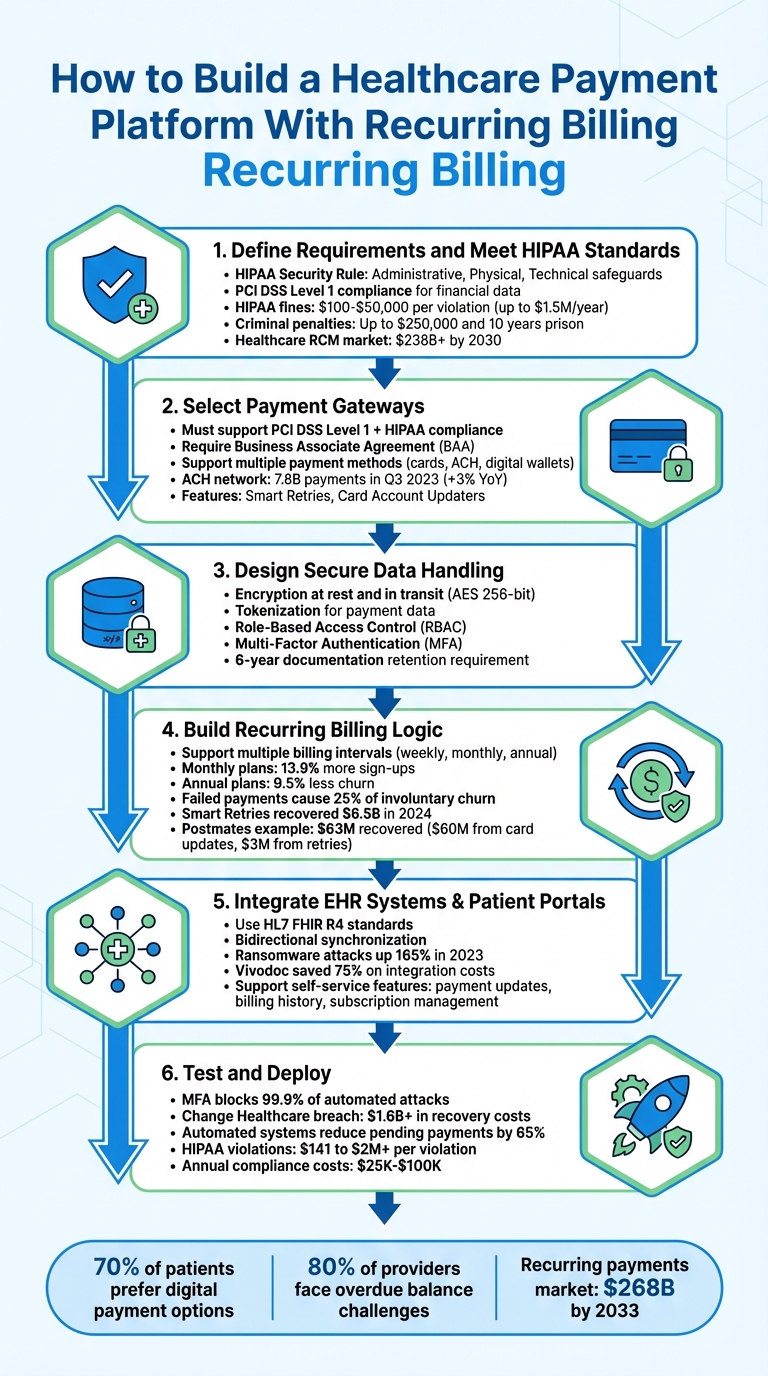
6 Steps to Build a HIPAA-Compliant Healthcare Payment Platform with Recurring Billing
At PayGround, Drew Mercer Simplifies & Digitizes Medical Bill Payments
sbb-itb-116e29a
Step 1: Define Requirements and Meet HIPAA Standards
Start by clarifying your platform's goals and outlining how it will safeguard patient data. Healthcare payment platforms face a dual compliance challenge: adhering to HIPAA standards for health data and PCI DSS Level 1 for financial data. Any system handling sensitive information like patient names or procedure details must enforce strict privacy measures and include robust safeguards for data access.
Understanding HIPAA and Healthcare Regulations
The HIPAA Security Rule lays out three key categories of safeguards to protect electronic protected health information (ePHI):
- Administrative safeguards: Conduct risk assessments, assign a security official, and limit ePHI access based on the "minimum necessary" principle.
- Physical safeguards: Control access to facilities housing ePHI and ensure proper disposal of hardware containing sensitive data.
- Technical safeguards: Implement unique user IDs, automatic logoffs, audit controls, and encryption for secure data transmission.
"The Security Rule is designed to be flexible, scalable, and technology neutral, enabling a regulated entity to implement policies, procedures, and technologies that are appropriate for the entity's particular size, organizational structure, and risks to ePHI." – HHS.gov
Failing to comply with HIPAA can result in steep penalties. Civil fines range from $100 to $50,000 per violation, with a yearly cap of $1.5 million for repeated violations. Criminal penalties for willful noncompliance can reach $250,000 in fines and up to ten years in prison. Additionally, breaches require notifying affected individuals and the Department of Health and Human Services (HHS) within 60 days, while maintaining compliance documentation for at least six years.
To minimize risks, consider tokenization, which replaces sensitive card data with non-sensitive equivalents. Enable automatic logoffs after inactivity to prevent unauthorized access. If partnering with third-party providers like payment gateways or cloud services, ensure they sign Business Associate Agreements (BAAs) to define their security responsibilities.
These compliance measures set the foundation for defining your platform's business and user requirements.
Identifying Business and User Requirements
Using compliance standards as a guide, outline how your platform will handle customer interactions and billing processes. Think about the entire revenue cycle, from preregistration to payment posting. The healthcare revenue cycle management market is expected to surpass $238 billion by 2030, driven by automation and the need to reduce manual errors.
Design your platform to align with healthcare workflows, incorporating features like:
- Split payments: Allow patients, insurers, and third parties to share costs.
- Flexible payment plans: With high-deductible health plans on the rise, patients are shouldering more expenses. Flexible payment options are essential.
- Self-service portals: Let users manage subscriptions, update payment methods, and review billing history.
Support multiple payment methods, including credit and debit cards, bank transfers, and digital wallets like Apple Pay and Google Pay. For recurring billing, establish clear authorization during sign-up, detailing payment amounts, frequency, and covered services. Use dunning management and smart retry logic to handle failed payments without disrupting services.
Additional features to consider:
- Real-time reporting and automated reconciliation for financial transparency.
- Refund management to streamline customer service.
- Collecting copays at check-in to reduce downstream billing workloads.
- Real-time insurance verification to confirm coverage before providing services.
Step 2: Select Payment Gateways for Recurring Billing
After identifying your compliance requirements, the next move is to choose a payment gateway that can handle recurring healthcare billing while adhering to strict regulatory standards. The gateway must support PCI DSS Level 1 certification for financial data and HIPAA compliance for health information, ensuring a robust dual-layer security system. Any breach involving both payment and health data can lead to serious legal and reputational consequences.
Evaluating Payment Gateway Features
When selecting a gateway, prioritize security and recurring billing functionality. Make sure the provider is willing to sign a Business Associate Agreement (BAA) - a legal necessity for sharing protected health information. Additionally, confirm that the gateway uses tokenization to safeguard sensitive data.
Your payment gateway should also support flexible billing models, including flat-rate, tiered, or usage-based options. To reduce involuntary churn, take advantage of features like Smart Retries and Card Account Updaters.
Offering a variety of payment methods is equally important. Credit cards allow for immediate authorization, while ACH bank transfers are cost-effective and often preferred for larger medical bills. To illustrate their popularity, the ACH network processed 7.8 billion payments in the third quarter of 2023, marking a 3% increase from the previous year. Digital wallets like Apple Pay and Google Pay provide added security through biometric authentication, making them especially appealing to younger patients.
Integrating Payment Gateways
Integration options depend on your technical capabilities and the level of customization you're aiming for. Low-code checkout solutions offer prebuilt, hosted payment pages, making them a great choice for quick and straightforward subscription sign-ups. For a more tailored experience, consider custom UI integrations using Elements or APIs, which give you full control over the design and workflow of the payment process.
Leverage webhooks to monitor key subscription events. For instance, track invoice.paid for successful renewals, invoice.payment_failed to trigger recovery actions, and checkout.session.completed to enable service access after a patient signs up. These tools help create a smooth and efficient self-service experience for patients.
To further streamline operations, support multiple payment methods - credit cards, ACH transfers, and digital wallets - and connect directly to EHR systems using open APIs. This eliminates the need for manual data entry. Additionally, build a patient self-service portal where users can update payment details, view billing history, and manage their subscriptions independently. These integrations ensure both financial and health data remain secure throughout the billing process.
"Healthcare payment systems need to reduce friction and improve the payment experience - for everyone involved." – Stripe
Step 3: Design Secure Data Handling and Authorization Workflows
Once your payment gateway is integrated, the next step is to build a backend that safeguards both PCI DSS-regulated financial data and HIPAA-regulated health data.
Implementing Data Encryption and Access Controls
Protecting sensitive information starts with encrypting all data - both at rest and in transit. Pair encryption with tokenization to replace sensitive payment details with random, meaningless strings.
Use Role-Based Access Control (RBAC) to limit access to electronic Protected Health Information (ePHI). Your access policies should adapt quickly to changes like promotions, terminations, or role shifts. For instance, employees who leave the organization should immediately lose access to data, and automatic logoff should be enforced on all devices. Sharing login credentials or passwords among staff must be strictly prohibited, as it compromises the accuracy of audit logs and access reports.
Add another layer of security by implementing multi-factor authentication (MFA) for all administrative access points. Use 3D Secure protocols to verify online purchases, and consider integrating digital wallets such as Apple Pay or Google Pay. These wallets add biometric authentication, like fingerprint or face ID, as an extra safeguard.
Creating Patient Authorization Processes
Once data protection measures are in place, focus on establishing clear patient authorization workflows. Ensure that all authorization forms include the HIPAA-required elements: a detailed description of the information being used, the names of authorized parties, an expiration date or event, and the patient's signature. For recurring billing, specify the payment amount, frequency, and the services covered.
"If a HIPAA Authorization Form lacks the core elements or required statements... the authorization will be invalid and any subsequent use or disclosure of PHI made on the reliance of the authorization will be impermissible." – Steve Alder, Editor-in-Chief, The HIPAA Journal
Incorporate these steps into your patient portal during registration or check-in, as engagement tends to be highest at these points. Provide patients with the ability to revoke their consent in writing at any time, as required by HIPAA. Additionally, retain all authorization forms and related documentation for at least six years to meet compliance requirements. Before granting access to billing data or privacy protections, your system should verify the patient’s identity.
| Security Measure | HIPAA Requirement | Technical Implementation |
|---|---|---|
| Access Control | §164.312(a) | Unique user IDs, automatic logoff, RBAC |
| Data Integrity | §164.312(c) | Encryption, tokenization, PCI DSS Level 1 |
| Patient Consent | §164.508 | Valid authorization forms (6-year retention) |
| Authentication | §164.312(d) | MFA, 3D Secure, biometrics |
With secure workflows for data handling and patient consent established, you’re ready to move forward with implementing advanced recurring billing logic.
Step 4: Build Recurring Billing Logic and Failed Payment Recovery
Once secure authorization is set up, the next step is creating a recurring billing system. This involves automating billing workflows and recovery processes, ensuring smooth operations and compliance with healthcare requirements.
Developing Flexible Billing Plans
Your billing logic should be designed to handle various scenarios, such as fixed plans for wellness programs or memberships and metered billing for pay-as-you-go telehealth services. Offering tiered plans - like basic and premium packages - provides patients with options that align with their needs and budgets, with pricing reflecting the included features.
To enhance flexibility, include proration logic. If a patient changes their plan mid-cycle, the system should automatically adjust charges based on the remaining days in the billing period. Additionally, support multiple billing intervals - weekly, monthly, quarterly, or annually - to match different treatment cycles. For instance, monthly plans often attract 13.9% more sign-ups due to their lower upfront cost, while annual plans help reduce churn by 9.5%.
Ensure payment methods are securely stored using card-on-file functionality, adhering to HIPAA and PCI DSS standards. Collect patient authorization during check-in with consent forms that clearly outline payment details, such as amount, frequency, and services covered. This approach not only automates payments but also keeps your processes compliant and reduces manual effort.
Implementing Failed Payment Recovery Strategies
Failed payments - caused by issues like expired cards or insufficient funds - account for up to 25% of involuntary churn. After setting up flexible billing plans, focus on recovery strategies to minimize revenue loss. For example, Stripe Billing's tools helped businesses recover an average of 41% of failed invoices in 2019, and by 2024, these tools had recovered over $6.5 billion in revenue.
One effective strategy is implementing smart retries, which use machine learning to determine the best times to retry failed payments instead of relying on fixed schedules. Another is using a Card Account Updater service, which automatically refreshes expired or replaced card details. For instance, in 2019, Postmates recovered over $63 million by using these tools: $60 million from updating more than two million expired cards and $3 million from recovering over 200,000 failed payments through smart retries.
To maintain trust, position payment notifications as part of patient care rather than debt collection. Provide options like pausing subscriptions or switching to lower-cost plans instead of immediately canceling services.
| Recovery Tool | Function | Revenue Impact |
|---|---|---|
| Smart Retries | Optimizes retry timing for failed payments | Recovered 200,000+ payments ($3M) for Postmates in 2019 |
| Card Account Updater | Automatically updates expired or replaced cards | Recovered $60M by updating over 2M cards |
| Pre-Dunning Alerts | Sends reminders before card expiration | Helps prevent payment failures |
| Guest Payment Links | Provides secure, personalized links for updates | Reduces friction in updating payment methods |
Step 5: Integrate with EHR Systems and Build Patient Portals
Once your billing logic and recovery strategies are in place, the next step is to connect your payment platform with Electronic Health Record (EHR) systems and create user-friendly patient portals. This integration streamlines data flow, minimizes errors, and gives patients the tools to manage their billing independently. Together, these features enhance both operational efficiency and the overall patient experience.
Synchronizing Billing Data with EHR Systems
To ensure smooth and consistent data exchange, rely on standardized protocols like HL7 FHIR R4. Using FHIR resources - such as ExplanationOfBenefit, Coverage, and Patient - ensures uniform data formatting across different vendors. Bidirectional synchronization is key here, allowing you to both read patient balances and write payment transactions directly into the system. This reduces manual errors and ensures billing transactions are always up-to-date in the patient's records, which is especially critical for recurring billing accuracy.
Data security is non-negotiable. Encrypt all data both in transit and at rest, enforce unique user credentials, and implement automatic logoff features to safeguard electronic Protected Health Information (ePHI). A written Business Associate Agreement (BAA) between your platform and healthcare providers is also required to clearly define responsibilities for protecting patient information. With ransomware attacks on healthcare organizations skyrocketing by over 165% in 2023 compared to the previous year, these precautions are more important than ever.
For faster integration, consider using unified APIs like NexHealth Synchronizer™, which connects to multiple EHR systems (e.g., Epic, Cerner, Dentrix) through a single interface. For example, Vivodoc used this approach to save 75% on integration costs while enabling billing data to auto-sync every 30 seconds.
Additionally, set up webhooks to trigger real-time notifications, such as for automated recurring payments. Use Ledger APIs to access patient balances, retrieve itemized charges, and directly record payments into the EHR’s financial ledger.
Designing Patient Portals
With a solid EHR integration in place, the patient portal becomes a direct extension of these capabilities for users. Think of the portal as a mobile-friendly hub where patients can manage appointments, view test results, and handle billing seamlessly. Ensure the portal supports multiple payment methods, including credit/debit cards, digital wallets (like Apple Pay and Google Pay), and ACH bank transfers.
Self-service features are crucial. Patients should be able to update payment methods, adjust subscription tiers, pause recurring plans, or review their complete billing history - all without needing to contact support. Make sure itemized charges are clearly displayed, with a breakdown that distinguishes insurance coverage from out-of-pocket costs.
"Clinics must prioritize the billing experience alongside the care experience so they don't lose patients to other providers".
For added convenience, include a guest checkout option via secure links, allowing patients to pay bills without logging into the portal. For recurring payments, implement card-on-file functionality with tokenization to securely store payment details. Be transparent about payment terms, including frequency, amounts, and cancellation policies, and always obtain explicit patient consent.
When payments fail, make recovery easy. A simple "Update Payment Method" button with clear instructions can help patients resolve issues quickly. Offering flexible options - like pausing a subscription or switching to a more affordable plan - can also help reduce churn while maintaining strong patient relationships.
Step 6: Test and Deploy the Platform
Testing for HIPAA Compliance and Payment Accuracy
Before launching your platform, make sure it meets all security and billing accuracy standards. Start with technical safeguard testing to ensure that AES 256-bit encryption is functioning properly for both data at rest and in transit. This step is crucial, considering that over 80% of healthcare data breaches are tied to software misconfigurations or missing encryption protocols.
Pay close attention to access controls. Test features like Multi-Factor Authentication (MFA), Role-Based Access Control (RBAC), and Single Sign-On (SSO) to confirm they’re working as intended. Did you know that MFA alone can block 99.9% of automated cyberattacks? A stark example of why this matters: in early 2024, Change Healthcare experienced a breach due to a server lacking MFA. The incident cost more than $1.6 billion in recovery efforts and disrupted healthcare payment services nationwide.
"HIPAA compliance in your billing software is a foundational safeguard for your revenue cycle. It ensures that every transaction... protects patient privacy and positions your practice for long-term success." - Jordan Kelley, CEO, ENTER
Run automated reconciliation tests to align payments with claims and catch any discrepancies in real time. Ensure your platform uses the latest Part 162 transaction codes and National Provider Identifiers (NPI) to avoid payment delays. For recurring billing, test dunning logic - automated reminders and workflows for failed payments - to maintain cash flow. Comprehensive audit trails are also a must; they should log details of who accessed or modified patient data and when.
If your platform works with third-party payment processors handling Protected Health Information (PHI), confirm that signed Business Associate Agreements (BAAs) are in place. This isn’t just a formality - HIPAA violations can result in fines ranging from $141 to over $2 million per violation, with annual penalties easily reaching millions. Automated, compliant payment systems have been shown to reduce pending payments by 65%.
Once you’ve rigorously tested for compliance and accuracy, you’re ready to deploy.
Deploying and Scaling the Platform
After thorough testing, move your platform into production with confidence. Start by testing all components in a sandbox environment, then use a "copy to live" feature to replicate the validated configuration in production. This method helps avoid errors during the transition.
Post-launch, set up real-time monitoring dashboards to keep tabs on performance. These dashboards can help you quickly identify missed payments or unexplained charges. Implement automated retry logic to recover failed transactions, which can significantly reduce involuntary churn.
"Monitoring the billing process for errors, missed payments, or unexplained charges is critical. It's important to regularly review the system's performance and make adjustments as needed." - Payline Data
To prepare for growth, use cloud-based infrastructure and open APIs. These tools allow your platform to scale seamlessly across multiple locations, teams, and payment channels as demand increases. With the healthcare revenue cycle management market expected to surpass $238 billion by 2030, building scalability into your platform from the start is a smart move.
Finally, appoint a dedicated privacy and security officer to oversee compliance and address any violations. Don’t rely on "set it and forget it" configurations - schedule quarterly security audits to keep your platform secure.
Technology Stack for Healthcare Payment Platforms
Picking the right technology stack is crucial for balancing the strict demands of healthcare compliance with the need for smooth payment processing. One key strategy is to securely collect payment data without exposing your servers. For this, you can use React Native to create cross-platform patient portals, and integrate Stripe Elements or Stripe Checkout for PCI-compliant payment forms. These forms rely on iframes to handle card data, ensuring sensitive information never touches your application server.
On the backend, Node.js is a great choice for building scalable APIs, particularly for managing subscription logic and handling webhooks. If your team prefers other programming languages, options like Ruby, Python, PHP, Java, Go, and .NET also work seamlessly with major payment processors. For database management, PostgreSQL is highly regarded for its ability to securely store HIPAA-compliant data. It’s commonly used to manage objects like subscription.id and customer.id, which are critical for verifying access and handling recurring billing cycles.
To meet PCI DSS and HIPAA requirements, tokenization replaces sensitive card information with meaningless tokens, while encryption protects data both at rest and in transit. As Stripe emphasizes:
"A breach involving personal health information and payment data is a reputational and legal crisis. Systems need real-time fraud monitoring, tokenization, and encryption by default, not as an upgrade".
These technologies form the backbone of secure and efficient backend operations.
Frontend, Backend, and Database Technologies
The frontend of your platform should ensure security while offering a smooth user experience. Tools like Stripe.js allow payment functionality to be handled directly by the provider, keeping payment details off your servers and maintaining PCI compliance. For patient-facing portals, React Native is an excellent choice, as it lets you build a single application that works seamlessly across iOS, Android, and web platforms.
On the backend, APIs handle critical tasks like subscription management, payment processing, and EHR synchronization. Node.js is particularly effective at managing concurrent requests, which is key for processing multiple recurring payments simultaneously. To ensure secure and reliable transactions, store customer and subscription data in PostgreSQL. Webhooks are essential for real-time updates - listening for events like payment_intent.succeeded or invoice.payment_failed ensures your backend stays informed, even if a patient exits their browser mid-transaction.
Together, these components create a scalable architecture for recurring billing in healthcare. For instance, eero integrated Stripe Billing with their NetSuite ERP, cutting their monthly financial close time by over 50% through automated payment data synchronization. Similar integration techniques can be applied to healthcare platforms to connect with practice management systems.
Integration Tools and Frameworks
To complement secure frontend and backend designs, integration tools and frameworks simplify data synchronization. Webhooks are particularly important for real-time communication between your payment gateway and database. By setting up listeners for key events like invoice.paid, checkout.session.completed, and invoice.payment_failed, you can automate processes such as service activation or recovery workflows. During development, the Stripe CLI is a helpful tool for testing webhook events and monitoring API calls in real time.
For EHR integration, look for platforms with open APIs or pre-built connectors. These tools reduce manual data entry and billing errors, improving both compliance and efficiency in your recurring billing system. When processing insurance claims, EDI (Electronic Data Interchange) systems enable standardized communication with payers, offering quicker turnaround times compared to manual submissions.
A great example of automated recovery tools comes from Postmates, which added over $63 million in revenue in 2019. They used Card Account Updater (CAU) to automatically update more than two million expired cards, recovering $60 million. Additionally, Smart Retries helped recover 200,000 failed payments, adding another $3 million. These same tools can be applied to healthcare subscription models, where up to 25% of customer churn may result from expired cards.
Finally, backend SDKs should accommodate a variety of payment methods beyond just credit cards. Supporting digital wallets like Apple Pay and Google Pay adds another layer of security through biometric features like FaceID or fingerprint authentication, offering enhanced protection for both payment data and patient health information.
Launch and Maintenance Guidelines
Planning a Successful Launch
A well-executed launch starts with thorough preparation, including staff training and system checks. Train your team on the essentials of the HIPAA Privacy Rule, security awareness protocols, and effective ways to discuss recurring billing with patients. As Steve Alder, Editor-in-Chief of The HIPAA Journal, points out:
"The effectiveness of the training provided to members of the workforce can make the difference between ticking the box of compliance or cultivating a culture of compliance".
Discuss payment expectations early - ideally during check-in - to avoid confusion later. To meet diverse patient needs, offer multiple payment options like self-service portals, text or email payment links, and automated phone systems. Sync your payment system with your EHR to minimize manual errors and ensure smooth operations.
Additionally, secure Business Associate Agreements (BAAs) with all third-party vendors, including your payment processor, to ensure they handle Protected Health Information (PHI) in line with HIPAA standards. Keep detailed records of all compliance activities for at least six years, as required by HIPAA.
By addressing these steps upfront, you’re setting the stage for a secure and compliant system that can handle long-term operations effectively.
Maintaining Compliance and Security
Launching is just the beginning - maintaining compliance requires ongoing effort and leadership. Assign a Privacy and Security Officer to oversee annual risk assessments, conduct regular vulnerability scans, and ensure compliance training stays current.
Use automated compliance software to monitor data access and alert your team to potential issues. Regularly review audit logs to track who accessed sensitive data and when, and create anonymous reporting channels to encourage staff to report HIPAA violations without fear of retaliation. As Steve Alder notes:
"Most poor compliance practices result from well-meaning intentions".
Address even minor violations quickly to prevent them from escalating into larger issues.
Annual refresher training is essential for keeping your team up to date, especially when there are changes to policies or procedures. To reduce involuntary churn - responsible for up to 25% of customer churn - use card account updater services to automatically update expired or replaced card details.
Monitor critical metrics like monthly recurring revenue (MRR), churn rates, and failed payment recovery performance to identify and resolve system inefficiencies early. Maintaining HIPAA compliance can cost between $25,000 and $100,000 annually, but this investment protects your organization from the legal and reputational damage of a data breach.
Conclusion
Creating a successful payment platform means finding the right balance between compliance, security, and scalability. Adhering to regulations like HIPAA and PCI DSS is non-negotiable - not only to avoid fines that can range from $100 to $50,000 per record but also to steer clear of potential criminal charges. A single data breach involving personal health information doesn’t just hurt your bottom line - it can permanently erode patient trust and jeopardize your entire business.
Security and user experience are the cornerstones of long-term success. For instance, tokenization enhances security by replacing sensitive data with irreversible tokens. On the user side, features like text-to-pay links, digital wallets, and smart payment tools make transactions seamless, which is crucial when 70% of patients prefer digital payment options and 80% of providers face challenges with overdue balances. Offering modern payment methods isn’t just convenient - it’s essential for maintaining financial stability.
Automation also plays a big role in optimizing payment recovery. Tools like smart retries and card updaters can significantly boost the recovery of failed transactions. Integrating payment systems with Electronic Health Records (EHR) further streamlines operations, reducing administrative tasks while improving cash flow. A real-world example? Eero cut its financial close time by over 50% after integrating its billing system with NetSuite. These kinds of solutions not only meet current demands but also prepare your platform for future challenges.
Looking ahead, the healthcare revenue cycle management market is expected to surpass $238 billion by 2030, while the global recurring payments market is projected to hit $268 billion by 2033. To stay competitive, your platform should support multiple payment methods - like ACH, HSA/FSA cards, Apple Pay, and Google Pay - offer flexible billing models (flat-rate, tiered, or usage-based), and integrate seamlessly with existing practice management software.
Start with compliance, build security into the foundation, and prioritize an outstanding patient experience. The choices you make today will determine how well your platform scales and adapts to future payment technologies. By following these steps, you’ll create a system that safeguards patient data, improves payment recovery, and evolves alongside the ever-changing needs of the healthcare industry.
FAQs
What compliance standards should I follow when building a healthcare payment platform?
When building a healthcare payment platform, following HIPAA regulations is non-negotiable, particularly the Security Rule. This rule lays out the necessary administrative, physical, and technical measures to safeguard electronic protected health information (ePHI). On top of that, the HITECH Act enhances these requirements, focusing on the secure management of electronic health records.
Staying compliant isn't just about meeting legal standards - it's about protecting sensitive patient information from breaches and unauthorized access, which is essential for maintaining trust. To meet these expectations, invest in strong security practices like encryption, strict access controls, and routine audits. These steps help ensure your platform aligns with the required standards.
How does integrating a payment gateway enhance a healthcare payment platform?
Integrating a payment gateway can greatly enhance the performance and dependability of a healthcare payment platform. By automating transaction processing, it minimizes manual work and reduces billing mistakes, leading to quicker payment settlements. This not only simplifies billing operations for healthcare providers but also helps maintain a steady cash flow.
On top of that, payment gateways bolster security by using tokenization to safeguard sensitive patient payment details, ensuring compliance with healthcare regulations like HIPAA. They also integrate smoothly with systems such as electronic health records (EHRs), keeping billing and patient data aligned while cutting down on administrative tasks. With features like recurring billing and support for various payment methods, providers can efficiently handle subscription-based care models and offer a better overall experience for patients.
What are the best ways to recover failed payments in a recurring billing system?
Recovering failed payments in a recurring billing system involves blending automation, clear communication, and offering flexible payment solutions. One effective approach is to implement automated retry attempts for declined transactions. Space these retries strategically - like after 1 hour, 24 hours, and 3 days - to address common issues such as insufficient funds or expired cards.
In addition, keep customers informed by sending email or SMS reminders that include secure links for updating payment information. To make the process even easier, offer a self-service portal where users can update their card details or select alternative payment methods, such as ACH transfers or digital wallets.
If automated retries don’t work after multiple attempts, you can escalate to manual collection efforts to address unresolved balances. This combination of strategies not only reduces revenue loss but also ensures a seamless and user-friendly experience for your customers.