


EMR integration is essential for healthcare startups to succeed. It allows applications to connect seamlessly with electronic medical record systems, improving data flow, reducing manual work, and ensuring compliance with regulations like HIPAA. However, the process can be complex due to technical challenges and strict requirements. Here’s how to approach it effectively:
- Start with a plan: Assess your current systems, define your goals, and involve key stakeholders like clinicians, IT, and compliance teams.
- Understand standards: Learn protocols like FHIR (modern, API-driven) and HL7 v2 (widely used but older) to ensure smooth data exchange.
- Use middleware wisely: Middleware tools simplify connections to multiple EMR systems, handling data transformation and security.
- Choose the right EMR platform: Evaluate options based on scalability, costs, compliance, and integration capabilities.
- Test thoroughly: Validate workflows, security, and data accuracy before deployment. Use synthetic data and load testing to simulate real-world scenarios.
- Plan for growth: Build scalable, event-driven systems that can handle increasing demand and adapt to changes over time.
How to Implement EHR/EMR Systems Integration with Your Health App System
Step 1: Assess Your Needs and Plan Your Integration
This initial step sets the stage for smooth interoperability and helps guide your platform choices later in the process.
Before diving into coding or signing contracts, take a moment to evaluate your current setup and outline your goals. Rushing into integration can lead to budget overruns and missed deadlines. This phase is all about creating a solid plan - understanding where you are, where you want to go, and who needs to be involved.
Review Your Current Digital Infrastructure
Start by analyzing the tools and systems you already use. Take a close look at your software, databases, and overall tech stack. Are you using a cloud database to store patient information? Do you already have a patient portal or scheduling system? What about analytics tools or billing software?
Document how data moves through your systems, your technical stack, and your security measures. Pinpoint integration points where your new EMR system will fit. Be sure to review your cloud configurations and API protocols - this will help you identify any potential impacts on existing connections.
It’s also critical to evaluate your current security protocols and authentication methods. Your EMR integration should enhance your security, not introduce new risks.
Define Your Business and Technical Requirements
Once you’ve assessed your infrastructure, turn your business goals into actionable technical requirements. What specific data do you need from EMR systems? Common needs include patient demographics and medical histories, but you might also require lab results, medication details, immunization records, or imaging reports.
Decide whether you’ll only access data from the EMR or if you’ll need to write data back into it. Many startups start with read-only access to simplify compliance and testing. Writing data back, however, involves more rigorous checks and requires adherence to stricter regulations.
Set clear performance benchmarks. Do you need real-time data syncing for clinical decision-making, or will overnight batch processing suffice for analytics? Define your expectations for latency, data throughput, and system uptime.
Budgeting is another key factor. Consider development costs, ongoing maintenance, API usage fees, and any certification expenses. Some EMR vendors charge fees per API call or patient record, which can add up as you scale. Knowing these costs ahead of time will help you avoid unpleasant financial surprises.
Finally, think about scalability. If you plan to grow from serving a handful of clinics to hundreds, your integration framework must be able to handle that growth. Building only for your current needs could lead to expensive overhauls later.
Work with Your Stakeholders
EMR integration is more than a technical challenge - it impacts your entire organization and your customers. Get clinical staff involved early in the process. Physicians, nurses, and medical assistants can provide insights into which workflows and data points are most critical.
Your IT and engineering teams play a key role in assessing the technical feasibility of your plans. They’ll help identify roadblocks, estimate development timelines, and address potential security concerns. Aligning your business goals with technical realities is essential.
If you’re partnering with healthcare providers, include their IT teams from the start. These teams manage access to their EMR systems and will have their own security protocols and approval processes. In some cases, health systems require months of security reviews before granting API access.
Don’t forget your legal and compliance teams. They’ll ensure your integration meets HIPAA standards and includes the necessary Business Associate Agreements (BAAs). Addressing these requirements early can save you from delays later on.
To keep everyone on the same page, create a shared document that outlines key details: the data you need, workflows you’re supporting, technical limitations, compliance requirements, and success metrics. This document becomes your integration roadmap and helps prevent scope creep as the project advances.
Schedule regular check-ins with stakeholders throughout the planning phase. As you learn more about EMR systems and interoperability standards, your requirements may shift. Keeping everyone aligned ensures the final integration meets your objectives and solves the challenges you set out to address.
With a clear roadmap in hand, you’ll be ready to dive into interoperability standards in the next phase.
Step 2: Learn the Interoperability Standards and Protocols
With your integration roadmap in hand, the next step is to dive into the protocols that make secure and efficient data exchange possible. Think of these standards as the shared language systems use to communicate effectively.
Healthcare interoperability relies on a set of well-established protocols that have been refined over decades. Getting familiar with these standards is essential for making smart integration decisions and steering clear of expensive errors. A solid grasp of the basics upfront can save you from costly rework down the line.
Several key standards dominate the healthcare space. HL7 (Health Level Seven) has been a cornerstone of healthcare data exchange since the 1980s. More recently, FHIR (Fast Healthcare Interoperability Resources) has emerged as a modern, web-friendly standard tailored for today’s applications. Building on FHIR, SMART on FHIR enables secure app integration, expanding the possibilities for healthcare applications. Understanding how each of these fits into your specific use cases is critical.
Your choice of standards depends on a variety of factors: which EMR systems you’re connecting to, the type of data you’ll handle, your team’s technical expertise, and your project timeline. For many healthcare startups, FHIR is a natural starting point because it’s optimized for modern applications and widely supported by major EMR vendors. That said, you’ll likely encounter HL7 v2 when working with lab results or admission/discharge notifications, so it’s important to be familiar with both.
Focus on the standards that align with your immediate needs. For instance, if you’re building a patient engagement app, SMART on FHIR might be your primary focus. On the other hand, if your project involves processing lab results or hospital admission updates, understanding HL7 v2 messaging will be crucial. Many startups begin with one standard and expand their capabilities as they grow.
Here’s how these components fit together: FHIR defines the structure of the data, SMART on FHIR ensures secure access, and middleware solutions handle the translation between formats. Combining these elements creates a smooth data exchange process across your systems.
The healthcare industry has poured significant resources into documentation and developer tools. Major EMR vendors offer sandbox environments where you can test their APIs without interacting with real patient data. These environments are invaluable for building hands-on experience and deepening your understanding of interoperability standards.
It’s important to remember that these standards are not static. FHIR, for example, regularly releases new versions, and EMR vendors frequently update their implementations to support additional features. Designing your integration with flexibility in mind - such as using abstraction layers in your code - will allow you to adapt to these changes without overhauling your entire application.
Before jumping into production code, your technical team should dedicate time to thoroughly understand these standards. Many startups rush into development only to realize later that they’ve built on outdated methods or misunderstood critical concepts. Spending just a few weeks learning upfront can save months of frustration and rework.
As you explore these protocols, pay close attention to how they handle common healthcare scenarios. For example, how do you retrieve a patient’s medication list? How do you submit a new observation or vital sign? What’s the process for managing updates to existing records? Understanding these workflows will help you design an integration that can handle the complexities of real-world healthcare systems.
Up next, we’ll break down the key standards and protocols you’ll need for your technical implementation. Stay tuned!
HL7 and FHIR Standards

Let’s dive deeper into two key standards shaping healthcare data exchange: HL7 and FHIR.
HL7 v2: The Veteran Standard
Since its introduction in 1987, HL7 v2 has been the backbone of healthcare data exchange. It’s widely used for tasks like sharing lab results, sending admission notifications, and managing patient transfers. The format? A pipe-delimited structure like this: MSH|^~&|SendingApp|SendingFacility|.... While reliable and time-tested, HL7 v2 presents unique challenges, especially for modern tech startups.
The main issue lies in its flexibility. HL7 v2 allows for extensive customization, which means every hospital or EMR vendor implements it slightly differently. What works seamlessly with one system might completely fail with another. This inconsistency forces developers to create custom mappings for each partner, which can drive up both development time and ongoing maintenance costs.
FHIR: The Modern Approach
FHIR (Fast Healthcare Interoperability Resources) takes a more developer-friendly route, using REST APIs with data formats like JSON or XML. Its core idea revolves around "resources" - modular blocks that represent clinical concepts such as patients, medications, observations, or appointments. Each resource has a defined structure with standard fields. For instance:
- A Patient resource includes fields for name, date of birth, gender, and contact details.
- An Observation resource might capture vital signs, lab results, or other clinical measurements.
This modular design allows developers to request only the data they need, avoiding the complexity of parsing massive message files.
For example, retrieving a patient’s medication list in FHIR is as simple as making a call to /Patient/[id]/MedicationStatement, which returns a clean, JSON-formatted response. Compare that to HL7 v2, where you'd need to construct a specific message type, send it through a message queue, parse the response using custom logic, and deal with edge cases unique to each vendor’s implementation.
Why FHIR Is Gaining Momentum
FHIR adoption has accelerated, thanks in large part to regulatory changes. The 21st Century Cures Act requires all certified EMR systems in the U.S. to support FHIR-based APIs. Since December 2022, these systems must provide patients with access to their health information through standardized FHIR APIs. This mandate has pushed major EMR vendors - like Epic, Cerner (now Oracle Health), and Allscripts - to prioritize FHIR support.
Beyond its ease of use, FHIR offers features that appeal to modern developers:
- Built-in security protocols: FHIR supports OAuth 2.0, simplifying the implementation of secure, authorized access to patient data.
- Real-time data exchange: FHIR enables real-time updates through subscriptions, so your app can receive notifications when relevant data changes in the EMR system.
Why HL7 v2 Still Matters
Despite FHIR's advantages, HL7 v2 isn’t going anywhere anytime soon. Many critical workflows in hospitals still rely on it, particularly for lab systems, radiology departments, and billing. If your startup needs to handle tasks like processing lab orders, receiving test results, or managing admission/discharge/transfer (ADT) notifications, you’ll need to support HL7 v2 alongside FHIR.
Key Technical Differences
The two standards operate on fundamentally different principles:
- HL7 v2: A message-based system where data is bundled into discrete messages and sent through queues or interfaces. It often requires specialized middleware to handle message routing and transformation.
- FHIR: A resource-based system that uses RESTful APIs, making it compatible with standard web infrastructure that most developers already know.
Versioning also sets them apart. HL7 v2 has multiple, often incompatible versions, while FHIR offers structured versioning (e.g., DSTU2, STU3, R4, R5) with clear migration paths. Most current implementations use FHIR R4, which became the normative standard in 2019.
Finding the Right Balance
For startups, a hybrid approach often works best. Use FHIR for patient-facing features and modern EMR integrations, while relying on HL7 v2 for legacy workflows that haven’t transitioned to FHIR yet. This strategy lets you leverage FHIR’s simplicity and flexibility without neglecting the workflows that still depend on HL7 v2.
Developer Accessibility and Performance
FHIR’s modern design makes it much easier to learn. Developers familiar with web technologies can get up to speed with FHIR in just a few days. Mastering HL7 v2, on the other hand, can take months of specialized training. This difference can significantly impact your hiring strategy and development timeline.
When it comes to performance, each standard has its strengths:
- FHIR: Ideal for real-time interactions and on-demand queries, such as patient portals or mobile apps.
- HL7 v2: Better suited for high-volume batch processing, like nightly lab result imports or bulk patient registration updates.
Understanding these distinctions allows you to tailor your EMR integration strategy to meet your specific needs and goals. Whether you lean on FHIR, HL7 v2, or a mix of both, the key is to align your approach with the workflows you aim to support.
SMART on FHIR for App Integration
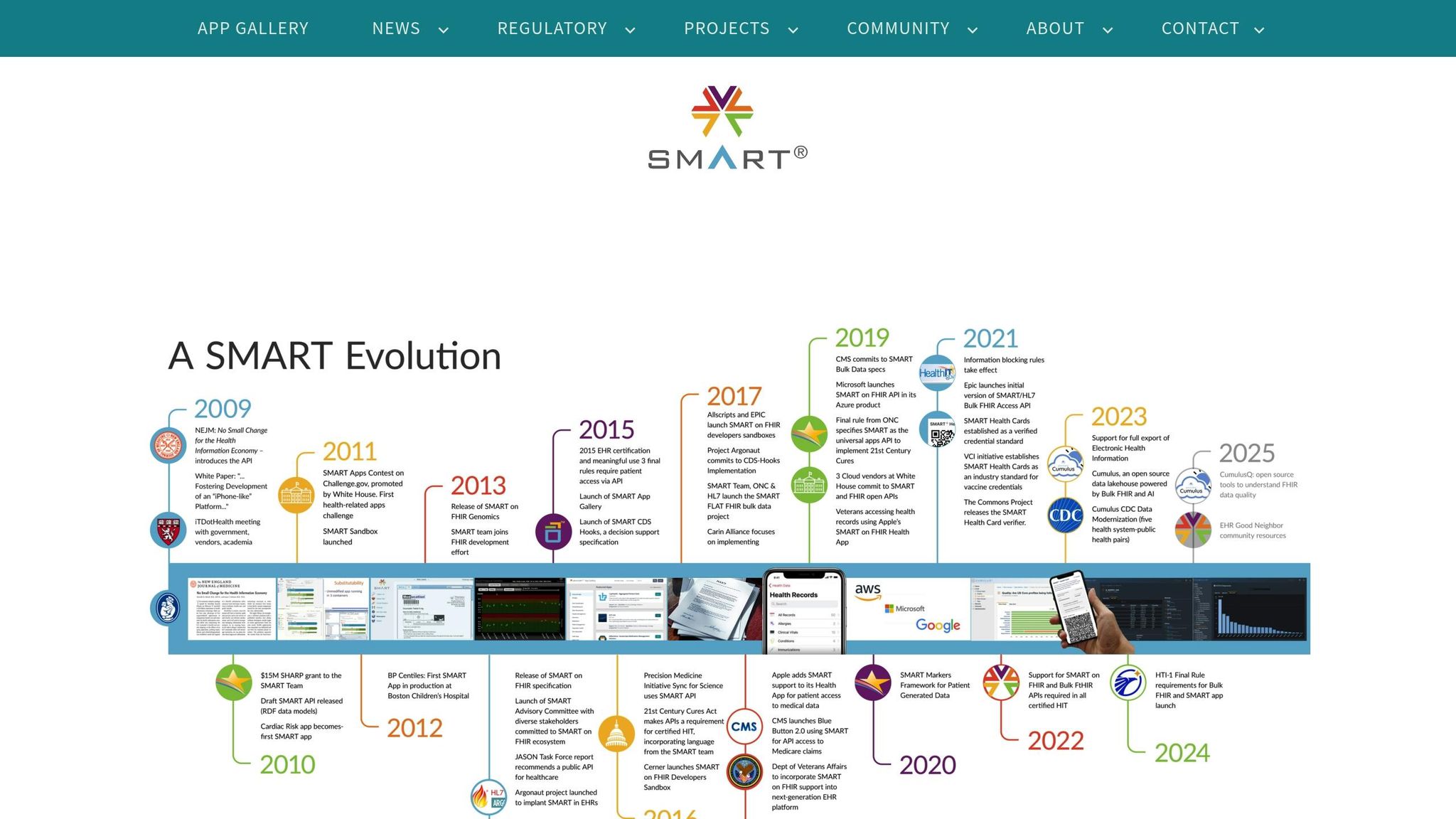
SMART on FHIR (Substitutable Medical Applications, Reusable Technologies) has made app integration much simpler for healthcare startups. Think of it as a universal framework that allows your app to connect with any compliant EMR system without needing to create custom integrations for each vendor. It's like a "plug-and-play" solution for healthcare technology.
Built on the FHIR standard, SMART on FHIR goes a step further by standardizing how apps launch and securely access data. This ensures third-party apps can integrate smoothly into EMR systems, access patient data securely, and fit seamlessly into clinical workflows.
How SMART on FHIR Works in Practice
The framework uses a "launch sequence" to handle app integration. When a clinician opens your app from their EMR system, SMART on FHIR takes care of authentication and authorization behind the scenes. For instance, if a clinician is viewing a patient’s chart, the app launches with a secure token that automatically provides access to that patient’s data.
This process eliminates the need for clinicians to log into your app separately or manually select a patient, streamlining their workflow and saving valuable time.
Why This Matters for Startups
For healthcare startups, SMART on FHIR solves one of the biggest hurdles: getting your app to work with multiple EMR systems. Before this framework, you’d need to negotiate individual integrations, which often required lengthy approval processes and custom development. Now, thanks to SMART on FHIR - a requirement for ONC 2015 Edition Cures Update certification - your app can integrate with any compliant EMR system using a standardized approach.
Additionally, SMART on FHIR ensures access to the United States Core Data for Interoperability (USCDI). This guarantees your app can retrieve key clinical data, such as patient demographics, medications, allergies, lab results, and vital signs.
Patient-Facing vs. Provider-Facing Applications
SMART on FHIR supports two main types of apps, each tailored to specific users:
- Provider-facing apps: These launch directly within the clinician's interface. They’re designed to assist with clinical decision-making, specialty workflows, or data visualization by using both the clinician’s identity and the patient’s context.
- Patient-facing apps: These launch from patient portals, allowing users to manage their health, track medications, or schedule appointments.
Both app types rely on OAuth 2.0 for authentication, with permissions tailored to the needs of each user.
Real-World Implementation
Take Canvas, for example - a fully ONC 2015 Edition certified EMR platform. Canvas provides SDKs that let developers build custom modules and user interface components that integrate directly into clinical workflows. By exposing FHIR APIs, it enables digital health companies to use the platform as a backend while creating tailored experiences for both patients and providers. This showcases how SMART on FHIR can simplify workflows and drive interoperability.
Technical Requirements and Certification
If you’re building an EMR platform, understanding certification requirements is crucial. ONC certification for FHIR APIs mandates OAuth 2.0 authentication and SMART on FHIR support. Your system must accommodate both patient-facing and provider-facing apps while ensuring robust security measures and detailed audit logging. Comprehensive API documentation and sandbox environments are also essential for smooth third-party integrations.
Developer Experience Advantages
From a developer’s perspective, SMART on FHIR leverages familiar web technologies. If your team is already comfortable with REST APIs and OAuth 2.0, the learning curve will feel manageable. The framework supports modern development practices, offering tools like sandbox testing, standard debugging utilities, and libraries in popular programming languages. This accessibility makes it easier for small teams to build advanced EMR integrations without needing deep healthcare IT expertise.
Strategic Considerations
The developer-friendly nature of SMART on FHIR lays the groundwork for a strategic integration plan. If your app interacts with EMR systems in real time or provides clinical decision support, SMART on FHIR should be your go-to framework. Its widespread adoption, regulatory support, and standardization make it a reliable choice for reducing barriers to market entry.
With SMART on FHIR simplifying EMR access, the next step is choosing an EMR platform that aligns with these integration needs.
sbb-itb-116e29a
Middleware and Message Brokers
SMART on FHIR offers a standardized way to connect apps with EMR systems, but startups often face a bigger challenge: dealing with multiple EMR systems, each with its own quirks - different technical requirements, data formats, and connection methods. That’s where middleware comes into play.
Middleware serves as a go-between, linking your healthcare product to external EMR systems or national health networks. Instead of creating custom integrations for every system, middleware provides pre-built connections. This makes tackling integration hurdles much smoother.
Why Startups Turn to Middleware
Startups often need to connect with systems that run on different versions of FHIR and HL7, use various authentication methods, or rely on proprietary APIs. Middleware takes on the heavy lifting by managing these connections and handling the nitty-gritty of data transmission, saving startups from building custom integrations for every single system.
How Middleware Simplifies Data Exchange
Middleware bridges the gap between differing standards and protocols, creating a unified layer for data exchange. For example, one hospital might require HL7 v2 messages, another might use FHIR resources, and yet another might rely on custom APIs. Middleware platforms handle these differences seamlessly.
They also simplify authentication. Whether it’s OAuth 2.0, API keys, VPNs, or digital certificates, middleware standardizes the process, so you don’t need to juggle multiple security protocols.
Another standout feature is real-time data transformation. Healthcare data comes in a variety of formats - CCDA documents, HL7 v2 messages, FHIR resources, or custom JSON structures. Middleware translates these formats on the fly, allowing your development team to work with a consistent internal data model.
Real-Time and Asynchronous Communication
Healthcare workflows demand both real-time and asynchronous data exchanges, and middleware supports both. For real-time needs - like pulling up a patient’s current medications during an appointment - middleware enables instant, on-demand queries. For asynchronous workflows, such as receiving lab results or admission notifications, middleware uses message queues and event-driven architectures to deliver updates without constant polling.
This flexibility ensures critical data is always accessible when it’s needed, whether for clinical decision-making or coordinating care.
Monitoring and Reliability
In healthcare, reliable data exchange isn’t optional - it’s essential. Middleware platforms often come with built-in monitoring tools to track message delivery and flag issues before they disrupt workflows. For startups without dedicated IT teams, this centralized view into data flows across all EMR connections can be a game-changer.
Strategic Considerations for Startups
Middleware can save startups significant time and effort by eliminating the need to build and manage multiple custom integrations. However, it does introduce a third-party dependency, often with transaction-based pricing. For early-stage startups, this trade-off is usually worth it. Middleware allows you to concentrate on your core product while ensuring reliable data exchange across a range of EMR systems.
That said, it’s important to evaluate when middleware is truly necessary. If your integration focuses solely on modern, ONC-certified EMR systems with robust FHIR APIs, direct connections might suffice. But if your customers use a mix of systems or require complex data transformations, middleware becomes a critical piece of your architecture.
With middleware streamlining data exchange, the next step is selecting the right EMR platform. This foundational layer sets your startup up for success, allowing you to focus on building and scaling your product.
Step 3: Choose the Right EMR Platform
Picking the right EMR platform is one of the biggest decisions your healthcare startup will face. This choice affects everything - clinical workflows, your ability to grow, and staying compliant with regulations. Unlike other software, switching EMRs down the line can be a major headache. It's deeply tied into billing, clinical operations, and care delivery, making your first decision incredibly important.
The global EHR market is expanding, with Epic Systems holding 37.7% of the acute care market and 43.92% of ambulatory care, while Oracle Health accounts for 21.7% and 25.06% in the same categories. However, these large players aren't always the best match for startups. For new healthcare companies, it's critical to choose a platform that fits both current needs and future ambitions.
Fast-growing health tech companies focus on platforms that can scale, integrate with other systems via APIs, and meet regulatory requirements. Instead of trying to check every box, prioritize features that align with your long-term strategy.
Build vs. Buy: Custom Development or Pre-Certified Platforms?
When deciding between building your own EMR or buying a pre-certified solution, consider three key factors: time to market, regulatory complexity, and technical resources.
Building a custom EMR gives you complete control over every feature and workflow. This allows you to create a system tailored to your specific needs, helping you stand out from competitors. But this approach demands significant technical expertise, regulatory knowledge, and time. You'll also need to handle ONC certification, HIPAA compliance, and ongoing maintenance.
On the other hand, pre-certified platforms offer a quicker path to launch. They come with built-in compliance, security, and integrations, making them a good choice for startups with limited resources. This lets you focus on your core product rather than building healthcare infrastructure from scratch.
A middle-ground option is decoupled (or headless) EHR systems. These platforms separate the backend data layer from the frontend interface, giving you the flexibility to design custom user experiences while relying on pre-built compliance and data management features.
With the total EMR market projected to hit $40 billion by 2025, driven partly by the increased demand following the pandemic, startups now have more options than ever. Many platforms are designed specifically for smaller practices or emerging healthcare models, offering tailored solutions that might better suit your needs.
Compare Platform Features and Costs
For small practices, EMRs are generally more affordable, easier to use, and better suited for specialized workflows compared to enterprise systems. To calculate your ROI, factor in both upfront and ongoing costs, such as data migration, add-ons, and hidden fees.
When evaluating platforms, don't just focus on the monthly subscription price. Consider all costs, including implementation, training, and transaction fees. Some vendors may charge extra for features like telehealth, patient portals, or advanced reporting - tools that might be essential for your business.
For instance, Athenahealth's cloud-based EHR boasts 99.98% uptime, ensuring the reliability that healthcare operations require. For startups, downtime isn’t just inconvenient - it can disrupt patient care and damage your reputation.
Specialized platforms like Healthie, which supports over 32,000 providers and impacts more than 12 million patients, show how tailored solutions can scale effectively. Similarly, OptiMantra reports that clinics see an average 37% revenue boost in their first year using its platform. These examples highlight the tangible benefits the right EMR can bring.
As the U.S. ambulatory EHR market is expected to reach $7.6 billion by 2030, it's clear that outpatient care is becoming a major focus. If your startup targets ambulatory care, look for platforms built specifically for that setting.
Key features to prioritize include seamless integration with billing systems, labs, imaging centers, and telehealth platforms. Data silos slow down operations, so it's essential to choose a system that works smoothly with your entire tech stack. Additionally, modern EMRs are incorporating AI and machine learning to improve documentation, provide predictive analytics, and enhance clinical performance. While these advanced features may not be essential right away, it's worth considering a vendor's roadmap to avoid being stuck with outdated technology.
Usability is another critical factor. A system with an intuitive interface and easy customization options will reduce training time and encourage staff to adopt it quickly. Always test free demos with your clinical team to uncover workflow issues you might otherwise miss.
Understand Compliance and Certification Requirements
When selecting an EMR, ONC certification and HIPAA compliance are non-negotiable. ONC certification ensures the platform meets essential standards for data capture, sharing, and security, which are necessary for participating in federal incentive programs. For startups, choosing an ONC-certified platform reduces regulatory risks and builds credibility.
HIPAA compliance involves robust security measures like data encryption (both at rest and in transit), audit trails, role-based access controls, multi-factor authentication, and breach notification procedures. These safeguards protect both your patients and your business from data breaches and costly penalties.
Beyond these basics, think about how the platform handles data governance and patient consent, especially as regulations around patient data rights continue to evolve. Appointing a project lead for EMR selection can streamline the evaluation process and ensure the platform aligns with your business goals. Also, check the vendor’s innovation roadmap to confirm it supports your growth plans over the next three to five years.
With patient care coordination becoming increasingly important, look for an EMR that enables smooth information sharing across systems. Choosing a scalable platform now can save you from the high costs and disruptions of switching later. Finally, review customer testimonials on trusted sites like G2 and Capterra to get a sense of user satisfaction and vendor reliability.
Step 4: Design and Build Your Integration Architecture
After choosing your EMR platform, the next step is building an integration architecture that works seamlessly. This isn’t just about linking systems together - it’s about creating a structure that supports clinical workflows, safeguards patient data, and grows alongside your startup. Early decisions here will impact both scalability and security.
Your architecture should deliver on the technical requirements and interoperability standards you’ve defined. It must also handle real-world healthcare scenarios like patients transitioning between providers, lab results automatically updating charts, and billing systems staying aligned with clinical documentation.
Map Clinical Workflows to FHIR Resources
Before diving into development, take the time to understand how clinical data flows within your organization. Begin by documenting key workflows such as patient registration, appointment scheduling, clinical encounters, lab orders, and prescriptions. Each of these workflows involves specific data points that align with FHIR (Fast Healthcare Interoperability Resources) standards.
FHIR organizes healthcare data into standardized resources like Patient, Practitioner, Encounter, Observation, MedicationRequest, and DiagnosticReport. The goal is to map your workflows to these resources while maintaining the relationships between data points.
For instance, when a patient visits your clinic, you’re not just collecting isolated data. You’re creating an Encounter resource linked to a Patient resource, referencing the Practitioner who provided care, and connecting to Observation resources for vital signs or Condition resources for diagnoses. This interconnected structure ensures the clinical narrative remains intact, not just a collection of disconnected facts.
When mapping workflows, pay attention to which FHIR fields are required versus optional. This helps you design data capture forms that gather the necessary information upfront, reducing errors during data exchange. For example, a Patient resource requires an identifier but becomes far more useful when you include details like name, gender, and birth date.
Consider how your workflows handle temporal relationships. For example, a MedicationRequest might reference a condition diagnosed in a previous Encounter. Your architecture must preserve these connections to provide clinicians with a complete picture of a patient’s care history. This is especially critical when exchanging data with external systems that may use different identifiers.
Start small by mapping only the essential FHIR resources for your minimum viable product (MVP). Most startups focus on Patient, Practitioner, Encounter, and a few clinical resources tied to their specialty. You can expand your FHIR implementation as your product and integration needs evolve.
Set Up Data Transformation and Secure Connections
Healthcare data rarely arrives in the format you need. Your integration architecture should include data transformation pipelines to convert formats like HL7 v2 messages, DICOM imaging data, or X12 billing transactions into FHIR resources your application can use.
This process often involves terminology mapping to bridge different coding systems. For example, diagnoses might arrive as ICD-10 codes but need to be converted to SNOMED CT for clinical decision-making. Similarly, lab results using LOINC codes might require translation for use in patient portals. Building a terminology service early on can save significant time and effort later.
Incorporate data quality checks into your transformation pipelines to validate that required fields are present, dates are formatted correctly, and coded values match expected sets. Set up logging and monitoring to quickly identify and resolve transformation issues.
Use an API gateway to manage authentication, rate limiting, request validation, and audit logging to ensure HIPAA compliance. All connections between systems must use encryption in transit (TLS 1.2 or higher) and encryption at rest for stored data. The SMART on FHIR framework simplifies securing API access with OAuth 2.0, enabling granular permissions.
For non-production environments, implement a data masking strategy. Developers and testers need realistic data but shouldn’t have access to actual patient information. Using synthetic data or properly de-identified datasets allows thorough testing without exposing sensitive data.
To ensure reliability, implement retry logic with exponential backoff for failed API calls, and use message queues to buffer data during outages. This ensures critical clinical information reaches its destination, even if initial transmissions fail.
With secure and reliable data pipelines in place, the next focus is designing for growth and responsiveness.
Plan for Scalability and Event-Driven Design
Healthcare startups often start small but can grow rapidly. Your integration architecture should be designed to scale effortlessly as transaction volumes increase.
Event-driven architecture is ideal for healthcare integrations. Instead of constantly polling for updates, systems subscribe to events and react when changes occur. For example, when a new lab result is available, an event can trigger notifications to the ordering provider, update the patient’s chart, and log the result for billing. This reduces unnecessary API calls and supports real-time updates across your platform.
Where possible, design for asynchronous processing. For instance, when a patient checks in, queue updates for background processing while providing an immediate response to the user. This keeps your application responsive, even as integrations grow in complexity.
Adopt a microservices approach with horizontal scalability to allocate resources efficiently and ensure fault tolerance. As your transaction volumes increase, you can add more service instances instead of upgrading to larger servers. This not only saves costs but also improves resilience - if one instance fails, others can continue handling requests.
Caching strategies can significantly boost performance for frequently accessed data. Information like patient demographics, provider directories, and terminology mappings doesn’t change often, so caching reduces database load and improves response times. Just ensure your caching layer can invalidate stale data when updates occur.
Use real-time observability tools to monitor your integration architecture. Track API response times, error rates, queue depths, and resource usage. Set up alerts for anomalies so you can address issues before they disrupt clinical operations. Downtime in healthcare systems is not an option, so proactive monitoring is critical.
As your database grows, think about data partitioning. For example, patient records can be partitioned by organization, region, or time period. This approach speeds up queries and simplifies data management, especially in multi-tenant platforms serving multiple healthcare organizations.
Build rate limiting into your APIs to prevent any single integration from overwhelming your system. Tailor rate limits based on use cases - for example, real-time clinical integrations may require higher limits than batch reporting jobs.
Finally, document your integration architecture thoroughly. As your team grows, clear documentation on data flows, security controls, and troubleshooting processes will make onboarding smoother and prevent costly errors during development.
Step 5: Test, Validate, and Deploy
Now that your integration architecture and design are in place, it’s time to ensure the system is ready for live operation. This phase is critical for identifying and addressing issues that could impact patient safety or compliance. Testing bridges the gap between theoretical success and real-world reliability. To prepare your integration for deployment, you’ll need to focus on functionality, security, data integrity, and user experience.
Test in Non-Production Environments
Start by setting up development, staging, and production environments. These environments serve distinct purposes: development is for rapid iteration, while staging mirrors production and acts as the final checkpoint before deployment.
Use synthetic patient data to simulate realistic clinical scenarios. This includes creating test patients with varied demographics, complex medical histories, multiple medications, and different insurance types.
Next, test your FHIR resource mappings by simulating full workflows. For example, replicate a patient visit from start to finish: registration creates a Patient resource, check-in triggers an Encounter, vital signs are recorded as Observations, lab work is ordered via ServiceRequests, and medications are prescribed through MedicationRequests. Ensure all resources connect seamlessly and data flows correctly between your application and the EMR.
Run load testing to evaluate how the system performs under stress. Simulate hundreds of users accessing records, placing orders, and updating charts simultaneously. Monitor API response times, database performance, and memory usage. Design your system to handle peak usage scenarios.
Don’t overlook error handling and recovery mechanisms. Test how the system responds to failures, such as network interruptions, malformed data, or EMR downtime. The integration should fail gracefully, log detailed errors, and retry operations where appropriate. Clinicians need clear, actionable error messages - not cryptic technical codes.
Validate your terminology mappings by testing with diverse code sets. For instance, send lab results using various LOINC codes or diagnoses with different ICD-10 combinations. Ensure your system translates data accurately without losing clinical meaning.
Document all test cases and their expected outcomes. This creates a regression test suite that can be reused with every code change. Automated testing is particularly valuable here, as it catches issues faster than manual validation.
Validate Data and Verify Security
Once functional testing is complete, shift your focus to data validation and security. Data validation ensures the information is accurate and meaningful, while security measures protect sensitive patient data.
Start by verifying data completeness. For example, when retrieving a Patient resource, confirm all mandatory demographics are included. Similarly, an Encounter should include details like date, location, and practitioners involved.
Check data consistency across systems. If a patient’s birthdate is January 15, 1985, it must match exactly in both your application and the EMR. Run reconciliation reports to identify and address discrepancies.
Validate temporal logic in your clinical data. For instance, prescriptions shouldn’t predate the encounters that generated them, and lab results shouldn’t have collection dates in the future. Logical checks like these prevent nonsensical data from disrupting workflows.
Audit logging is another critical area. Every access to patient data must generate a detailed log entry, showing who accessed what information, when, and from where. HIPAA requires such audit trails, so test logging thoroughly to ensure compliance.
Perform penetration testing to identify vulnerabilities. Security professionals can probe your system for weaknesses, such as unauthorized access or injection attacks. Address these issues before deployment.
Verify your OAuth 2.0 implementation for SMART on FHIR specifications. Test various authorization scenarios, such as clinicians accessing patient data, administrative staff viewing schedules, and patients reviewing their records. Ensure scope restrictions function correctly, and tokens expire as expected.
Encryption is non-negotiable. Test encryption for data both in transit and at rest. Confirm that all API communications use TLS 1.2 or higher and that stored data is encrypted with industry-standard algorithms. Securely manage and rotate encryption keys according to your policy.
Finally, run a HIPAA compliance checklist to ensure safeguards like access controls, encryption, and breach notification procedures are in place. Test your data backup and recovery processes to confirm you can restore data quickly and accurately in case of loss. Measure your recovery time objective (RTO) and recovery point objective (RPO) to ensure they meet organizational needs.
Plan Your Go-Live and Train Your Staff
Thorough testing and validation pave the way for a smooth deployment. Start by creating a detailed go-live plan with clear timelines, assigned responsibilities, and rollback procedures. Choose a deployment window - typically during low-activity periods like weekends or evenings - to minimize disruptions.
Consider a phased rollout strategy instead of a full-scale launch. Begin with a small group of tech-savvy clinicians who can provide feedback and help resolve issues. Gradually expand to other departments or locations as confidence grows. This approach limits the impact of any unexpected problems.
Prepare comprehensive training materials tailored to different user roles. Clinicians need guidance on how the integration affects their workflows, such as accessing patient data or placing orders. Administrative staff require training on scheduling, billing, and reporting, while IT teams need technical documentation for troubleshooting.
Use the staging environment for hands-on training. Allow users to practice common tasks in realistic scenarios before working with live data. Record training sessions for future reference and create a knowledge base with guides, screenshots, and video tutorials.
Identify super-users who can assist their colleagues during and after the rollout. Set up a help desk or communication channel, like Slack, for quick issue resolution. Establish a robust support system for go-live day and the following weeks.
Communicate regularly with stakeholders, providing updates on the timeline, changes, and benefits of the integration. Transparency and open dialogue help address concerns and build trust. Change management often requires as much effort as the technical implementation.
Prepare rollback procedures in case critical issues arise. Define clear criteria for when to revert to the previous system, and test these procedures in staging to ensure they work smoothly. Knowing you have a safety net can ease stress and encourage innovation.
Monitor the system closely after deployment. Watch for error spikes, performance issues, and unusual activity in audit logs. Set up alerts for critical problems and hold daily check-ins to review metrics and feedback.
Collect feedback systematically from users to identify what’s working and what needs improvement. This input will guide post-launch updates and help prioritize future enhancements. Often, users will uncover edge cases or use cases you didn’t anticipate.
Plan for ongoing improvements after go-live. No integration is flawless on day one. Use feedback and operational data to build a backlog of enhancements, but avoid overwhelming users with rapid changes. Stability is key to building confidence in the system.
Document your lessons learned while they’re still fresh. What worked well? What could be improved? These insights will be invaluable for future integrations or platform expansions.
Conclusion
EMR integration is a challenging yet vital step for healthcare startups aiming to thrive in a competitive industry. Success hinges on thoughtful planning, technical know-how, and strict adherence to regulatory standards. By following the five steps outlined in this guide, your startup can create integrations that are secure, scalable, and genuinely useful in clinical settings.
Start by assessing your current infrastructure and defining clear requirements. Collaborate with clinicians, administrators, and IT teams to outline both business and technical needs. This foundation ensures your integration aligns with real-world demands.
Next, focus on standardizing data exchange. Familiarize yourself with interoperability standards like SMART on FHIR, which supports secure app integration. Tools like middleware and message brokers can streamline data flow between systems, ensuring smooth communication.
When selecting an EMR platform, weigh the pros and cons of custom development versus pre-certified solutions. Carefully evaluate platform features, costs, and compliance considerations to make an informed choice.
Map clinical workflows to FHIR resources with precision, and establish secure connections using OAuth 2.0 and TLS encryption. From the outset, design your system to handle scalability, ensuring it can adapt to real-time clinical events without overloading your infrastructure. Event-driven architectures are particularly effective for this purpose.
Once your design is in place, rigorous testing is essential. Use synthetic data to simulate real-world scenarios, validating the system’s accuracy, security, and HIPAA compliance. A phased rollout combined with thorough staff training reduces disruptions and builds confidence in the new system.
Keep in mind that EMR integration isn’t a one-and-done effort. Healthcare regulations, standards, and workflows evolve, so plan for continuous updates. Regularly collect user feedback and stay informed about industry changes to ensure your system remains effective.
When done right, EMR integration can revolutionize clinical operations. Startups that prioritize patient safety, data security, and ease of use will not only improve patient care but also gain a competitive edge. The ultimate goal is to make clinicians’ jobs easier, enabling them to focus on what matters most - delivering exceptional care. A well-executed integration doesn’t just support your business; it drives growth and enhances outcomes for everyone involved.
FAQs
What are the main advantages of using middleware for EMR integration in healthcare startups?
Middleware is essential for making EMR integration smoother by enabling efficient communication between various systems. It allows healthcare startups to automate the transfer of patient details, test orders, and results across platforms with precision and speed.
This automation helps reduce errors from manual data entry, enhances system compatibility, and saves valuable time. As a result, healthcare providers can dedicate more attention to patient care instead of getting bogged down by administrative work.
What steps can healthcare startups take to ensure their EMR integration complies with HIPAA regulations?
To keep your EMR integration in line with HIPAA regulations, it’s critical to prioritize strong data security practices. Start by implementing solid encryption protocols to safeguard sensitive patient information. Add strict access controls to ensure only authorized personnel can view or modify data, and keep an eye on your systems with regular monitoring to catch any potential breaches early.
On top of that, make sure your workflows and tools comply with HIPAA’s Privacy and Security Rules. Regularly perform risk assessments to identify vulnerabilities, provide your team with compliance training, and partner only with vendors who sign Business Associate Agreements (BAAs) - a necessary step to confirm their commitment to HIPAA standards. Taking these measures will help your startup stay compliant while securing patient data.
What should healthcare startups consider when deciding between building a custom EMR system or using a pre-certified platform?
Healthcare startups face an important decision when choosing between a custom EMR system and a pre-certified platform. This choice depends on several factors:
- Budget and timeline: Building a custom system demands a considerable investment of both time and money. On the other hand, pre-certified platforms are typically quicker to implement and more affordable upfront.
- Scalability and flexibility: Custom systems can be tailored to meet specific needs, offering a high degree of flexibility. However, pre-certified platforms often come with built-in scalability, making them a practical choice for rapid growth.
- Compliance and security: Pre-certified platforms are usually designed to meet regulatory requirements like HIPAA from the start. Custom systems, however, will require additional work to ensure they meet these strict standards.
- Interoperability: It's essential to evaluate how well the system integrates with other tools and platforms, ensuring smooth access to patient data across various systems.
The right choice ultimately depends on your startup's long-term goals and what aligns best with its operational priorities.
Related Blog Posts
- How to Build a Production-Grade FHIR API for EHR Integration
- How to Integrate FHIR APIs with Epic, Cerner, and Other Major EHRs
- HL7 v2 vs FHIR in 2026: Choosing the Right Path for Legacy EMR Integrations
- How to Connect Your Healthcare App to Athena, Epic, or eCW


0 thoughts on "The Simple Guide to EMR Integrations for Healthcare Startups"